It has been a really amazing period from October-Feb with so many new machines being released into the community, my own needs and desires for the 'perfect' machine are now starting to materialise.
MendelMax isn't 100% perfect, but it's the best machine I have built to date - and I really like it.
MendelMax.

I have now been using a 'finished' MAX for the last 6 weeks, It's really great, and easy to hack with, I have already upgraded quite a few parts and built a whole new X Carriage concept based on using the MAX for a while.
MendelMax Created by kludgineer - the files and many derivatives can be found on Thingiveres Here -
I have added links to my changes below -
I built up a frame concept back in 2010 out of 20mm Extrusions, but it never got past this picture -

It would have been an interesting machine. When I spotted MendelMax I just had to build one (or more)
I'm not going into too much details about building up MendelMax, most of it is straightforward, I'll focus more on where I have deviated from the 'standard' design.
MendelMax home page is here and the MendelMax GoogleGroup is here
So firstly all the 4 different machine designs are +80mm or more longer on the X axis, so I can fit a Dual+ extruder (and my new X carriage, see below).
I decided to get different sets of Aluminium extrusions cut for four different sized machines. - I need better names but -
1) - The normal model is just 80mm bigger on X - this would be more than adequate for most situations and is very similar to a Prusa Mendel in size and shape.
2) - The mini model is more like a Huxley, it's going to be a single extruder (Bowden Fed) and designed to be very strong and transportable (150mm x 150mm bed size)
3) - The Big model is what I have built up first, this is going to be for my hack and test machine, with the ability to print upto 305mm x 305mm bed size.

Big Max and Mini Max
4) - The Massive one is a little silly really, and I'm not sure I'll build it up, and certainly not with 8MM smooth bars.

The Frame around the Mini Max above is the lower section of the Massive model, build area is about 450mm x 450mm, not sure what the Z would be, around 320mm+ I expect.
I'm using Bosch-Rexroth 20mm Aluminium Extrusions from KJN here in the UK - They are a really excellent company to deal with, and offer great pricing and cut to length service as standard! - Do take a look.

This was my stack of Extrusions - 2.7M long package on a wood base to keep it all straight.

You will need to Tap the ends of almost all the frame sections, and with Bosch Rexroth you need an M6 Tap - the Mitsumi Extrusions listed on the MendelMax home page use M5 - so check before you buy the bolts!


This joint is the most tricky to join and get right, it's also a little tricky to print, check Thinginverse for a really nice derivative by jib also easier to print.


Assembly is very easy, you can use official T-slot Nuts or normal Half height M5 nuts (much cheaper)


Or, if your feeling adventurous print your own plastic T-nuts, I made a dual version and plate here
I have used a few of these on my first Max and they are holding up perfectly, I will try building the next one completely out of these.


I'm using some metal reinforcing brackets on the bigger models, it also means you can leave off the plastic bracing pieces from the top of the machine, looks a little nicer in my opinion.

It was about 5 degrees C outside when my Bling machine printed these.
I don't recommend printing in the cold! - Ambient needs to be over 13 degrees C for successfully printing in PLA, it's a nightmare below that temperature.


NOTE : - Just spotted this really nice Y idler with built in belt tensioning by DanFineArt - very cool.


Really nice LM8UU Holder for the Y axis - by jridley

Simple MDF Clamp for the Y axis belt, I'll fit an adjustable one at some point, or change to this Y idler

I contemplated a 20mm Alu frame for the Y axis, opted for MDF just to get it running.
Heated build Bed.
I considered designing a bigger PCB heated bed, and also an aluminium one, but as this was a test to see if I would need, and actually also use a bigger build area. I firstly decided to use a standard V2 Prusa PCB and a standard copper clad PCB to spread the heat over a wider area.

I'm using the 'spare' hole in the middle of the Prusa V2 PCB to clamp using a countersunk M3 screw into my copper clad PCB board.

Simply wired up and clamped with M3 screws in the corners and middle, thermistor is on the copper clad board at the side. The middle screw is also acting as a cable strain relief.
I'm not a believer in measuring the temperature in the middle of a head bed, I always measure at the edge or corner.
LM10UU and LM12UU versions of MendelMax parts are starting to appear on Thingiverse

Back to the old style Z design (Clamp, rather than push-fit) - slight modifications including an adjustable Z- height screw/spring. Slightly, shorter, fatter and chunkier all around.

I always add Kapton tape to the X bar going into the Z ends, helps them grip in the plastic, I do this even if using push-fit Z ends.

I'm using Aluminium Flexible couplers on Max - these are really great if your Z axis is supported. They should not really be used on designs where the Z axis is hanging (Prusa and Huxley) or compressing (Printrbot and Wallace) without using some sort of support for the Z threaded rods.
I have started seeing a lot of people fitting these to designs that really need a solid coupling, for that I would always use Nopheads Motor coupler

On MendelMax the support for the Z rods are provided by Thrust bearings (shown above).
I'm also using M6 threaded rod for the Z axis over the more common M8, I find it gives better results and does not fight with the M8 Smooth rods for control over the X carriage placement in horizontal alignment when moving the X carriage vertically.
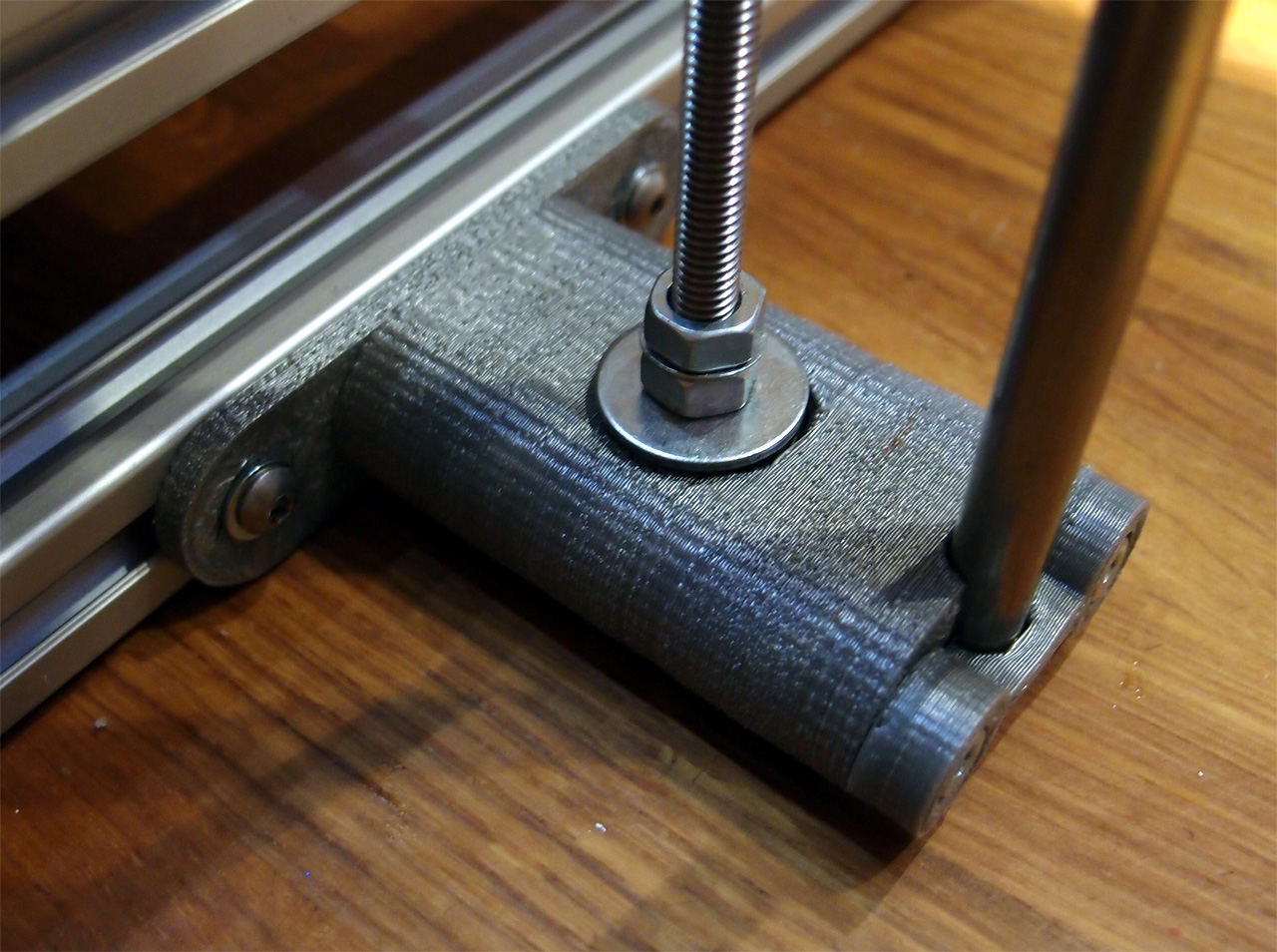
The original Z supports looked like this, and still used M8 Thrust bearings with a washer on top to allow for the smaller M6 threaded rod, quite a noisy arrangement, so they got changed to the below versions after first testing of the machine.

This is based on the Z axis mount design by AlephObjects my version of changes the Thrust bearing size so M6 Rods can be used and also fills up some holes in the AlephObjects version along with making it a little easier to print (mainly the vertical curve on the back - it now has a sharp bridge point).
My version for the M6 threaded rods can be found on Thingiverse here.
Even with just two M4 bolts holding on my Greg's accessible extruder I still find it a pain to swap-out extruders so I decided to re-design the X carriage to allow a quick extruder change and also make it big enough for Dual extrusion and mounting other things -
I'm not yet experienced with OpenSCAD so I used Sketchup for this design, if anyone apart from me finds the idea useful it would be great to do it as a parametric OpenSCAD model, I can already see a need for a LM10UU version.


I'm getting to grips with Sketchup now, you can do quite a lot with it.
It's up on Thingiverse Now - if you want to print one.
My aims for this design -
Horizontal X design compatible spacing with Mendel, Prusa Mendel and MendelMAX
Use Linear bearings (LM8UU) and make them very easy to fit.
Quick-fit and removal of Extruders (And other devices... more on that shortly)
Maximum space for extruder/hot-ends/heat-sinks between the smooth X bars
Allow dual or more extruder's to be fitted at once.
Allow for an easy extension of the X carriage (for future upgrades) - that needs some explanation, see below.
Printable on a Prusa, Huxley or TOM without support material.

This is my design for a 'Quick-Fit' clamp and expandable X-carriage -

It's printed vertically in two parts, without the need for support material - bolted together.
A key feature about the design is that you can extend it, even when it's fitted on the machine, you would unbolt the two halves and insert a printed spacer each side then bolt back together, allowing triple extruder's to fit or something bigger...

4 linear bearings LM8UU are used and provide the widest space for extruder's whilst keeping compatible with Mendel, Prusa, and MendelMax X bar spacing.

I know it looks big, but actually is only uses a little more length and when you have a normal Greg/Wade extruder fitted to any other X-carriage it usually overhangs by almost the same amount.

It uses a small Mendel style Bearing for the Quick-fit latch.

The latch is quite tall in this picture, it's a little smaller now.

I have updated Greg's Extruder to be Quick-Fit and defined the spacing for the standard carriage adapter plate to be 100mm wide.

It has an adjustable belt clamp.

This is an example adapter for a normal Wade/Greg extruder to turn it into a Quick-fit version.


Lower profile Catch

This shows a Dual extruder setup on the Quick-Fit adapter - using 2 x NEMA 14 (Huxley style) extruder's side-by-side.
Here is a Short video showing fitting and removal of the Quick-Fit Extruder on a Quick-Fit X carriage.

So this is what my Quick-Fit extruder looks like, you can fit and remove it in seconds.

Quick extruder connection is now Via a 9way D-type and 2way for heater.
Similar to how Nophead has done it on Mendel90.


My setup is for Dual extruder's using the RAMPS 1.3/1.4 Electronics.


*EDIT* - this Amazing Gearset is by triffid_hunter
It's Thing 10707 Here - I have used 4 different types of Herringbone gears over the last year, and this is the best in my opinion.
I printed this with a normal 0.5mm nozzle, I'm sure it would be even better with a smaller nozzle if you have one.
Herringbone gears have a long history now and there are lots on Thingiverse, do also checkout the Awesome Herringbone Gear set from Rhys and Sublime and I also really like the look of this one by RevK but that's one I have not had time to try yet.

I have also switched over to using Greg's new 'Guidler' -

My version (shown above and here on Thingiverse) is slightly modified with a lever, more support for the guides and an M3 nut trap on both sides.
My current hot-ends of choice are J-Heads - I could do a whole post on how good they are. I do make a few changes before using them - Here is what I do to a normal MK-IV hot-end -
All of this is done for mounting, cooling, support of the PEEK at it's weakest point and to stop as much heat from rising up the PEEK as possible.

Take a standard M12 Linear Rail mount (£1.50) and drill out to 16mm or slightly under.
Widen the mounting holes (more than in this photo) and de-burr edges.
You then have the minimum amount of Aluminium for support and maximum cooling.
You could start with a M16mm rail mount, but they are much bigger overall and will be heavy.

You can drill more holes to allow better cooling.

Fit and tighten around the PEEK/Nozzle end this way around.

You can then fit 12/16mm M4 Nickel coated brass PCB stand-off's to the extruder body
Screw in Stainless steel M4 screws and washers, clamping the PEEK into the extruder nice and tight.
Optionally also fit a nut on the thread, to lock it on the stand-off.

After this fit your heating resistor (6R8 or 5R6) and thermistor and do remember to insulate the brass part with Ceramic rope/tape, glass rope/tape and/or Kapton.
For Printing in PLA I use a small 40mm directional fan blowing across the Aluminium rail block and across the fins in the PEEK, for Printing in ABS, don't use a fan.
When building the big Max, I needed a glass bed, but wanting to keep down the weight I went looking for some 2mm glass, didn't have much luck and out of desperation I decided to try using a mirror, it was a good test size and easily came out of the nasty plastic frame. And it was only £1 from my trusty home shop.

- The glass surface heats up fast and spreads heat very evenly over the surface, cool-down is quick but seems slower than just plain glass alone.
- I hear less 'cracking' of the parts as they cool down.
- For me PLA parts never seem to completely lift-off when cooled, don't ask me why this is, maybe thermal expansion, retraction is acting differently due the the reflective surface, but they stay a little stuck down - still very easy to remove with fingers, but all other glass surfaces I have used to date make the parts lift completely when cooled.
- I needed to reduce my bed temperature from 60 degrees down to 45 degrees for PLA when using the mirror surface, if you don't do this it's like building on jelly, the PLA stays so very soft.
- I think you could go lower than 45 degrees, I'll investigate at some point.
- You need your first layer height set perfectly, (can be higher than normal) if not it seems to make more of a mess as the PLA is seems much softer for at least the first 3mm of building.

The mirror is also very handy for monitoring first layer bonding and looking at the underside of the X carriage.

2mm Mirror Glass with PET tape for printing ABS
I would be highly interested in any feedback on this topic - try it out if you can.
UPDATE - While I was typing this bit up, a post appeared from Theodleif on the RepRap Forum suggesting using a solution of sugar water painted onto a hot mirror-tile for printing ABS, sounds interesting and If we can ditch the PET tape it could be Great. I have not tried this yet, but will give it a go soon.
Electronics -

I used a scrap piece of Acrylic for the Electronics and PSU mounting, I wanted to make it all very super easy to access and tinker with on this machine.
The Acrylic plate slides into the vertical 20mm Slot sections that are also being used as reel mount for plastic filament reels.

A 240W 12V Power supply was mounted on the left.

With nice and easy Ring terminals for the connections.
One the left we have Mains 240V
Then the main +12V and GND connection to the RAMPS board
Heated bed source and Various other +12v signals for Lighting and fans.

RAMPS is simply mounted with M3screws and an ultra quiet, slow moving 80mm Fan for cooling the stepper motor drivers and Mosfets.

Using Stepsticks again and small heatsinks.

When you connect to screw-terminal connections (as on RAMPS) you should crimp the wires into wire ferules before inserting into the screw-terminals.
The smaller wires also crimped in are for an LED indicator on the outputs of Heaters 1 and 2 and also the Heated bed, quite handy to see what's energised. I need to make a little printed box for the LED indicators.
That's my first MendelMax - I'm really pleased with it.
A short video of the Big and Mini MendelMax machines
Watch it in full HD on my Youtube channel here -
I have popped on to IRC a few times (as RichRap) It's really great, and opens up a whole new level of community spirit and help that the RepRap Forum does not convey. BUT it's a real time zapper, I would love to be on there more, but I'm going to have to finish some more projects first or they will never get done.
And I finally decided to get on Twitter, I going to blame Raspberry Pi :) for that, but I did eventually end up getting a RPi on order, so it was worth the early wake up, and Twitter looks another very interesting community for 3D printing.
I'm on Twitter as RichRap3D You can find me Here -
Mendel Bling Sold -
Many thanks to everyone that contacted me before, during and after the Bling eBay Auction, I spent the following week getting messages back to everyone, It really generated a lot of interest.
The Winner and new owner of Mendel Bling is James. Even though James had a long way to come, we had a great evening discussing 3D printing and I must have talked for at least a solid 3 hours straight. If I do that again, I'll video it as an intro tutorial.
James is planning to use his 3D printer to assist in one of his new businesses exploiting further work and research he did in his P.H.D.
James had some really good upgrades planned for Bling, I'm looking forward to see what he does with it and what it prints next. Almost everything on my Blog was printed on Bling, It did such a fantastic job for me printing most days for the last 7 months I'm a little sad to see it go.

James on the Left above and me on the Right
Thanks James, it was really great meeting you, I hope you enjoy using your new 3D printer !
Don't forget the South West RepRap meet up is this weekend (24th March 2012) - check out the forum messages and keep in touch - A big thanks to Hamish (hairykiwi) for organising this one. I hope to see some of you there.
Not a day goes by without something new going on in the 3D printing community, it's already a very interesting start to the year, I can't wait to see what comes next.
I'm really excited about my next Blog update, It's something I have been working on for a while now, finally it's fit for release, I'm sure some of you are really gong to like it.
Thanks for reading, let me know if you make a MendelMax or try out the Quick-Fit X-extruder concept, and I have many more extruder's and tools planned for this X carriage, I hope you find it useful too.
Rich.


