Showing posts with label Extruder. Show all posts

Friday, 7 April 2017

LulzBot TAZ 6 Testing Part 2 - Problems, Printing, Materials and Tuning to perfection.

For this second part of the TAZ6 setup I'm looking at some initial issues found with the setup and operation of the TAZ6. These were quickly resolved, but showing you the process may assist if you have similar problems on your 3D printer.

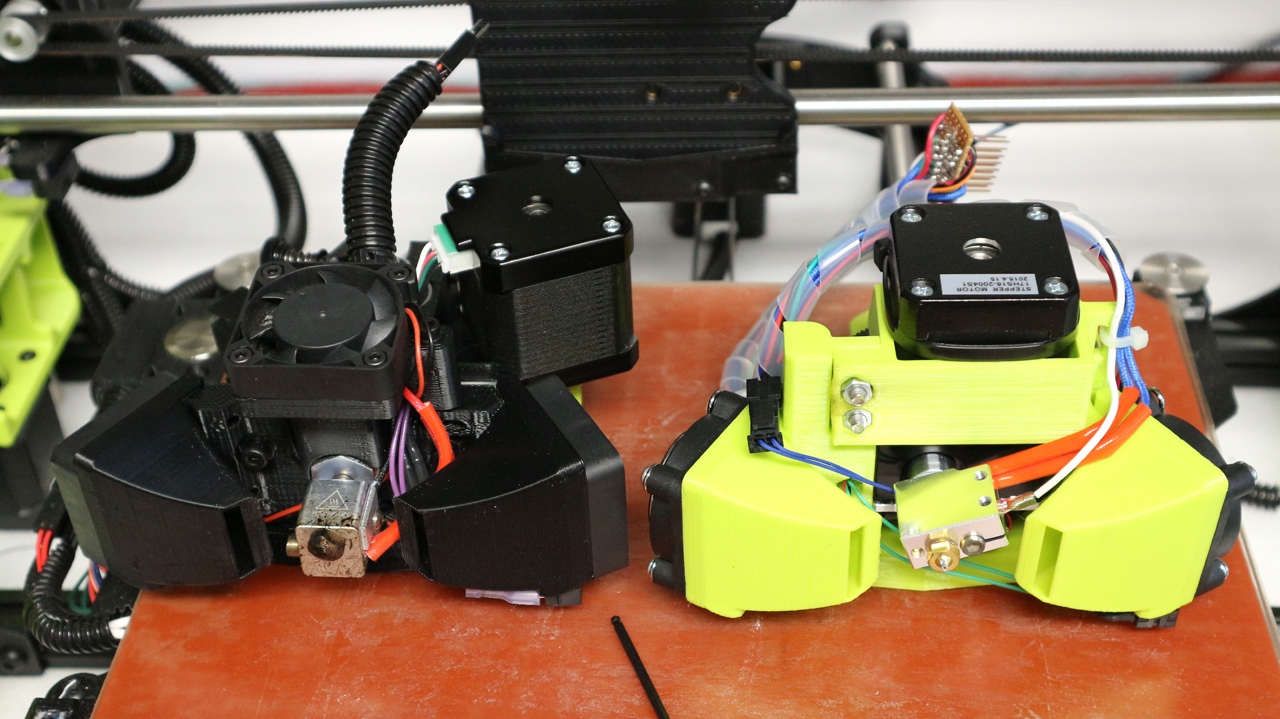
I was also sent a MOARstruder by the LulzBot team, I talk about it in the video along with a custom tool-head I have made for the TAZ 5/6 using the E3D Titan AERO extruder+hot-end.


Further details about the MOARstruder can be found here, on the LulzBot Website.

The MOARstruder has a 'Volcano' compatible 1.2mm nozzle and long heating block for 100g+/hour deposition rates.

I'll post a separate blog and video about the Titan AERO extruder mount for the TAZ6, I'll also post the files if you wish to try to out too. The Titan AERO saves around 178 grams in weight over the original Hexagon tool head, so you can fling it around faster too.

Further details about the E3D Titan AERO extruder and hot-end system can be found here, on the E3D Website.

The first blog post (Part 1) and video about the TAZ 6 can be found here


The Video below is also over on YouTube if you wish to watch in HD and also subscribe to my channel for more videos, help and advice.


If you want to skip parts, then here is a quick jump index -

00:10 - Intro & Catch up
00:50 - I have a MOARstruder !!!
01:15 - We can print MOAR
02:10 - 3Kg of Polymaker PLA
03:10 - Special Colorfabb nGen
05:00 - E3D Titan AERO on the TAZ6 (Volcano)
06:40 - Mesh Bed levelling setup advice
09:15 - Tweaks, changes & results
09:30 - Setup problems & solution

I will post an update on the print progress with both the MOARstruder and the Titan AERO on the TAZ6.

I'll also tidy up and share my firmware setting changes and print profiles I'm now using for TAZ6 printing. I initially started with PLA, then nGen and PETT (t-glase). I still have Nylon, flexible and composite profiles to generate and test.

On with the 3D printer setup and a few wiring problems...

I had one initial problem with the SD card reader built into the TAZ6. The SD card was not being recognized on the LCD display as being inserted.

First I thought that the SD card may just have been blank or faulty, but after checking it had some contents and was formatted correctly I investigated further.

This cable for the SD-Card connector had fallen off - I'm guessing during transport.

After opening up the side panel housing the power supply and the main electronics control board, I soon spotted that a cable was hanging in mid-air over the main RAMBo control board. When checking this was easily identified as the main serial connection to the SD card mounted on the user interface LCD display board.

Only 4 pins of this 8 way connector are being used, that's not a great deal of friction to lock this connector in place. If you look at the connector in the bottom right, you can see that spare unused pins have been fitted into the 8 way connector. Adding these unused but fitted pins adds more friction and helps to lock the connector onto the mating pins. Especially important on this cable as only two pins are connected. A much better solution is to for positive locking connectors to the RAMBo electronics board.

I checked the correct orientation and connected the cable back onto the RAMBo board. this resolved the SD card reading problem, and allowed me to get started on a test print that's included on the supplied SD card.

This was a simple problem and a simple fix, but for anyone without the confidence or desire to open up the TAZ6 it may have been only fixed by returning the machine to the supplier or manufacturer.

This cable and a few others used on the RAMBo are not 'positively locking', this means that they could fall out with a sudden jolt or unfortunate movement of cables. In this case it was probably during transportation as LulzBot would have checked (and indeed they supply a printed check-sheet of machine functions) that the SD card interface was working before leaving the factory.

This connector for the SD card also only has a few connections fitted, this means that it has quite low friction and is even more likely to fall out. Over the last 25 years as an electronics engineer I have seen a number of ways to combat this problem, you can simply add more crimps into the spare unused pin positions as a way to increase connection force (friction) as seen above. But the best way is to use locking connectors on the electronics board. The basic box header connections usually fitted to RAMBo (and other 3D printer electronics) are very low cost and used everywhere. You can get compatible shrouded box connections that incorporate both polarizing features - to ensure the connector is not connected in reverse or off-set and also a plastic locking clip that will keep the connector mated until you want it to be removed. They would be a drop-in replacement, so would not require any changes other than a different supplier on the electronics bill of materials. One other nasty way is to add a drop of hot-melt glue or silicone to physically 'lock' the connector cable to the board, but that's really not a good solution.

In my view, changes to this and some of the other connections ( housings and mating cables) on the RAMBo board would significantly reduce the chance of cables becoming accidentally dislodged in use or transit.

I would be interested in knowing if anyone has had a similar issue with this or any other electronics that do not use positive locking connectors (comment below if you have or have an opinion on this issue).

On the plus side the wiring inside the electronics box is tidy and many attempts have been made to improve the safety factor for anyone opening up this machine. Mains voltages are well routed with correct terminals crimped and fitted so minimal exposure to live parts are exposed.

Obviously make 100% sure the mains power input is removed and disconnected before you open up any 3D Printer or any other device for that matter.

The power supply is also CE marked as is the entire machine. Along with both European and American EMC testing standards.

As well as a CE mark and electrical safety, it's obvious that this machine has also gone through EMC and electrical standards for operation and interference. That's a really good thing and something that we still do not see on many other 3D printers sold as kits and fully assembled machines.

The round grey ferrite filters shown in the images below, are wrapped around various cables. This indicates that during machine testing of EMC and EMI areas were identified that needed some suppression of electrical noise.

The mains input filter (metal can in left side of image above) also helps to reduce conducted emissions back down into the mains of your house (and other people's houses).

Usually long cables like motor connections for example will act like ariel's attached to the electronics, these can radiate electrical noise and can also pick up radiated electrical noise from other equipment around you.


 Adding a ferrite clamp can often reduce these problems and allow EMC approval of a machine like a 3D printer.


Seeing these indications of a well designed, carefully assembled and correctly tested product makes me very happy. It's something many users don't even think about, but when you have a product with heating components, high currents and moving cables, I would strongly urge you to ask the questions - Has the machine you are considering been both safety tested and passed relevant electronic approval standards for your country?


Top tip for limiting the use of Mesh bed levelling -

If your 3D printer uses mesh bed levelling (it takes a number of probe point measurements across the bed and uses this to compensate for an incorrectly levelled surface) - Then do spend some time trying to get the bed manually as level as possible.

Why? - Basically because when the hot-end moves around the build area it has to constantly raise and lower the Z axis. The Z axis is the slowest linear movement on your 3D printer. Having a poorly setup bed is also more likely to cause print issues like blobs or strings if you are doing long travel moves, where the mesh levelling compensation is adjusting for +/- >0.5mm of uneven surface.


* Update* - The next two images show an example of how to level the X/Z axis. Below the next two images are also some pictures I used as an example in the video of how to help minimize Mesh bed level movement. The measurement distance on each side of the TAZ6 are slightly different (~3mm) so to make sure you level correctly for the TAZ6 3D printer please follow this link here from the team at LulzBot. - 
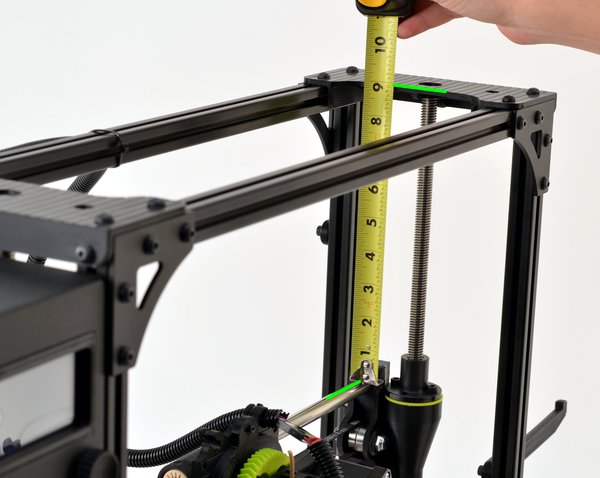

The LulzBot team measure the lengths from the X axis bars to the top, and that's a much better way for the TAZ6 3D Printer.
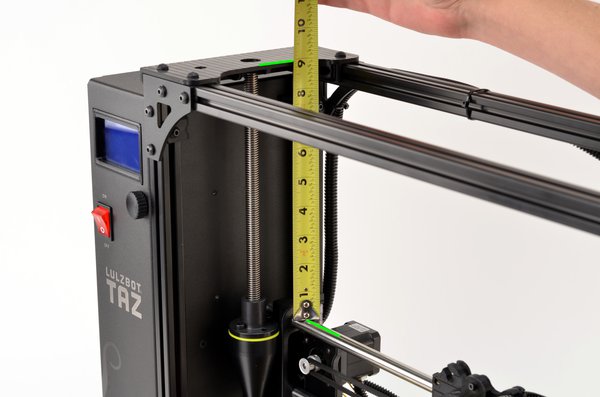


For many 3D printers using mesh bed leveling you can measure each side of the Z axis, and manually turn each lead-screw so they are the same (Again, do check how to do this correctly for the TAZ6, see above).


The most important thing is that the nozzle is at a level and flat point across the entire build surface, so if the left and right lead-screw are at different positions, then that's fine. 


Then check if that has actually made the nozzle distance the same on each side of the build surface.
If not, then adjust so wherever you manually move/place the nozzle (move X / Y carriages) it has a similar distance from the build surface (+/- <0.2mm if possible).

You will get better results if you do this, and you can then also start to tune the firmware to reach higher operating speeds and smoother print results. I'll go over my TAZ 6 Firmware changes in a future video.

Just to give you a sense of the change a few firmware and slicing settings can make to the end print result, take a look at the images below -

First layer of the shelf model - It's perfect.
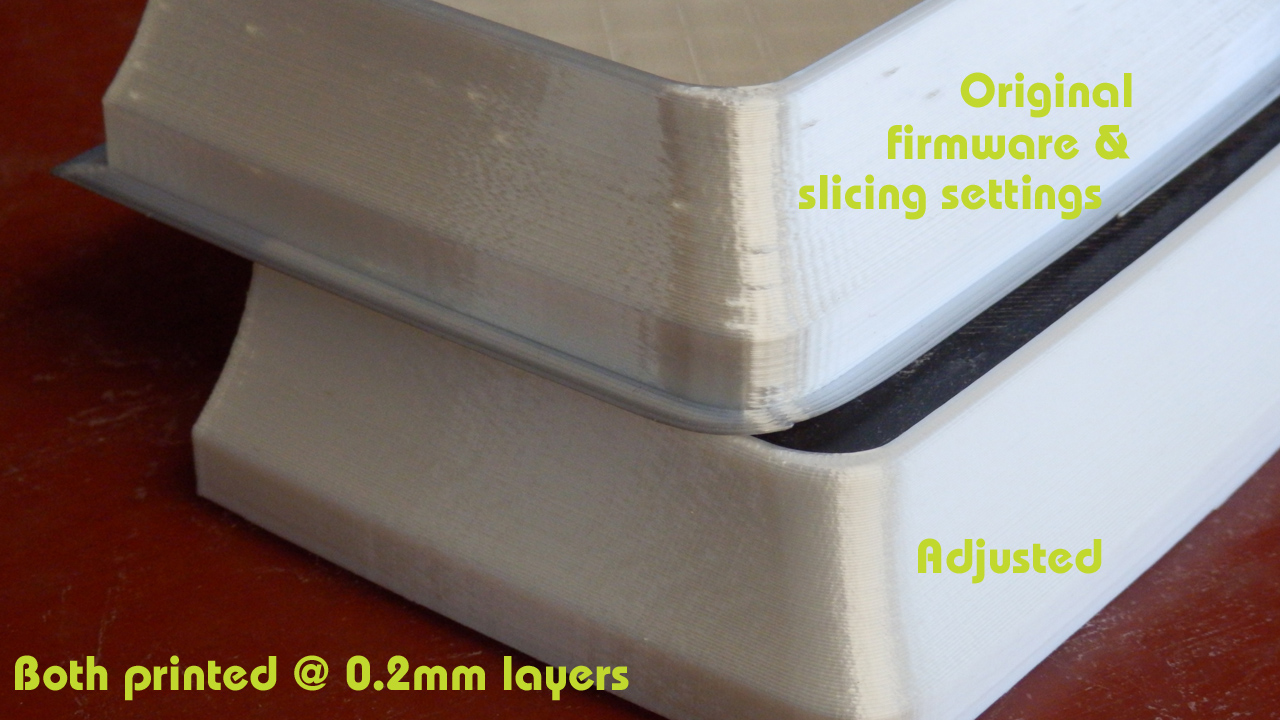

Top part in the image above was printed with the original TAZ6 firmware settings and default Cura profiles for TAZ 6 PLA.

The lower model was printed at the same layer height, same infill and same number of perimeters. The difference was a few firmware changes and revised profile settings. The bottom model also printed around 20% quicker than the original setup.

I use Polyalchemy Elixir PLA to test print quality, it will show up the smallest flaw in printing settings, so it's great to refine your profiles and acceleration settings.

The above model is the really nice secret shelf by Tosh You can get the file here

I'll show more examples of these changes with printed models in the next TAZ 6 video.


Before I made the firmware and profile changes, I did print out the samples Gcode models on the supplied SD Card. They show up some print issues, but they can all be resolved with setting changes.


Printed in Colorfabb nGen (light grey because it shows up defects well to the camera).


You can see some missing perimeter sections in the top of the funnel above.


We also have a few blobs and retraction strings, all of these problems can be resolved. And when they are the TAZ 6 becomes a stunning 3D Printer.

3DBenchy - Attribution: CreativeTools http://www.thingiverse.com/thing:763622

I'll continue to add more video's and blog posts about the TAZ 6 adventure as they get completed. Please leave comments and feedback below. And I'm really interested in also hearing from any existing LulzBot TAZ owners.

I hope this was useful, thank you for reading & watching, see you next time.

Rich.


Please join me on Twitter @RichRap3D   -  https://twitter.com/RichRap3D

Files and designs shared on YouMagine - https://www.youmagine.com/users/richrap

Files and designs shared on GitHub – https://github.com/RichRap

Files and designs shared on Repables - http://repables.com/u/richrap/

My Youtube channel is here, all 3D Printing and Hi-Def video content.


Friday, 31 March 2017

Upgrades and changes to the BCN3D Sigma 3D Printer including Bondtech extruders


SIGMA v2016 3D Printer upgrades, changes and tweaks

In this blog post I'm collecting up all the modifications, changes, upgrades and general improvements I have done to the Sigma (2016 version) over the last ~18 months.

This blog post and video is for the Sigma 2015/16 versions, and may not be the same for the new Sigma R17 (2017 model).


A lot of the information here is also relevant for any 3D printer, things to check, changes to make and improvements.

The main goals were to improve complex print performance - especially dual colour or dual material 3D Printing on Sigma, and also to reduce the noise.

Thank you to the team at BCN3D for the allowing me to test out some of the upgrade boards in this machine, and also to Emvio Engineering and Bondtech for the dual drive Extruder upgrade kit.

All the info is in the video below, and feel free to use the quick jump point index if there is something you specifically want to know about -

Quick jump index -
00:10 - Intro to Sigma 2016 changes
02:20 - Auto Fan control for hot-ends
04:30 - Hot-end Thermistor changes (PTFE removal)
07:50 - Adding heatsink compound to Hot-ends
12:10 - Fitting Bondtech Extruders to Sigma
16:00 - Updating Firmware eSteps/mm for Extruders
17:10 - Printing with Sigma and Bondtech extruders
18:00 - Further thoughts on testing and upgrades
19:00 - Compare print results
Final thoughts and wrap-up.


Video is also over on YouTube if you wish to watch in HD and also subscribe to my channel for more videos, help and advice.

I'll post a few images below as they are easier to see than in the video. My thoughts and advice are in the video so I'll keep the post short and look forward to any comments or questions - feel free to post here or in the YouTube comments. Thanks.

In the video I look at a number of significant changes Including -

Automatic fan speed control for both hot-ends -


Hot end improvements -

I replace the original hot-end thermistor sleeves (PTFE Max temperature 250 Deg C) with Fibreglass (300+ Deg C)


Still using the grub-screw to clamp for now, but I comment on why this is not really a good idea.


 I show you how to remove the Hot-ends and improve their thermal performance by adding thermal heatsink compound.


I then fit Bondtech dual drive Extruders into Sigma and compare print results.


In all comparison testing I used exactly the same Gcode for both system configurations of extruders (just the eStep/mm setting was changed in firmware for the new Bondtech gear rate).

The Hollow Draudi printed small with standard 0.4mm nozzles is a very tricky small print for FFF 3D printers - Designed by BCN3D

You can get the file here from Youmagine.

"The Hollow Draudi is designed to be created on resin 3D printers mainly due to their empty geometry. In addition, all orifices, modeled with Rhinoceros and Grasshopper, give it a unique personality and a plus of difficulty that will challenge any 3D printer FFF."


This is a tricky print - the extruders need some tweaking, but even with exactly the same Gcode used we can see less stringing and better formed structures between the holes.


Smoother extrusion on the feet - easier to see on the Brim rings - less indications of the individual extruder stepping points on the Bondtech print.


Low-Poly Bulbasaur - Multi and Dual Extrusion version - by- Agustin Flowalistik

Get this great 3D model from Youmagine here


Smoother extrusion and less problems with filament control here using the Bondtech extruders.

And yes, I know you can get better results out of the Sigma, by slowing down the print speed and being slightly less aggressive with the extruder settings, but I wanted to do a like-for-like comparison of exactly the same Gcode here to show the difference a gearbox and dual drive teeth make to a 3D printers extrusion system.

Sigma 2017 -

I also now have the new Sigma R17 machine now, so do keep an eye out for another comparison of the above tests along with the new Sigma R17 version.


If you have a Sigma 3D printer and need any help or advice, please catch me on twitter and I'll do my best to help out. I have been printing with Sigma for a few years now and have (I think) mastered using it for single and dual colour/material printing. It's my go-to printer for all dual 3Dprinting.

I'm really excited for the new Sigma 2017 and can't wait to show you what it can do.

Thank you for reading & watching, see you next time.


Rich.

Please join me on Twitter @RichRap3D   -  https://twitter.com/RichRap3D

Files and designs shared on YouMagine - https://www.youmagine.com/users/richrap

Files and designs shared on GitHub – https://github.com/RichRap

Files and designs shared on Repables - http://repables.com/u/richrap/

My Youtube channel is here, all 3D Printing and Hi-Def video content.


Wednesday, 25 May 2016

Upgrades and printing with the BCN3D Sigma dual extruder 3D Printer

My update on using the BCN3D Sigma 3D Printer for the last 6 or so months.


Do check out the video for a more visual feast into the madness of my modifications :)


You can also watch it in HD over on my YouTube channel here (and please subscribe, thank you)

A few months back  Last year (2015), I posted about my first few weeks using the BCN3D Sigma 3D Printer, here is an update on some of the changes and how I have been getting along with the machine.

As I said in my previous video and blog post, the BCN3D Sigma is a really great 3D Printer. It has many of the key features people are looking for in a machine they need to produce 3D Models.

Because the Sigma is a fully built and tooled up machine, it's not really aimed at the low-end or to compete with the kit build market. That said, it's excellent value for money with the bonus of having dual independent print heads, it's a great 'production quality' desktop machine.

I have just now, in early 2016 spent my own hard earned cash on buying a Sigma, not something I do lightly. And I could not afford a brand new one, so it's actually second hand. I was very lucky someone in the UK wanted to sell it. (thank you so much for driving it to me, you know who you are, I am highly grateful and now use this machine every single day).


That's probably the best and most genuine endorsement I can give a machine. Spending my own money on a printer, now, when I already have a few is significant.


The Sigma is still the best built production machine I have used (so far) - finally on-par with my own custom 3D Printers I have built and still use over the many years of doing this.

I have done all the usual things with Sigma, printing fast and 'draft quality' to slow and fine layer models to examine the details that can be produced. I'm not so concerned with ultimate quality when 3D printing. I would much rather a fast and accurate, strong print using a fat nozzle.

All these dual colour pots were using 0.6mm nozzles and a fast print profile with 0.2mm layers.
The print time was under 5 hours for each one. The quality is not 'perfect' but more than good enough for kids to use and for 'practical' applications.


In fact I have a 5 hour rule, if I can't print it in under 5 hours, then I use a bigger nozzle, or lower quality or wait until the weekend (and then it may not happen). So for me, 3D printing is more about getting something that's accurate and strong, not ultimate quality.

Sigma can do quality, but with a change of nozzle size and pushing the speed, it also does fast too.

Dual printing is where this machine really stands out from the other 'dual extruder / dual nozzle' systems available. This is an area where I am most excited for FDM, Having useful models, and an ability to 'actually print almost anything' is a fundamental goal for desktop 3D Printing.

 Two ways to dual 3D print - Above bigger tool-change retractions and no purge tower.

 Or use a tower and avoid jamming up the hot-ends because of long retraction <<< Do this method!


Above is the Nervous System dual treefrog - a tricky one to dual 3D print. It was the second thing I printed on the new machine, right after the test calibration pattern (above). Both at 0.4mm nozzles, and a 0.2mm layer height, set to print fast (65mm/sec) - not ultra-fine quality, but a solid and fast 3D print in under 4 hours.


Like everything that's designed or configured for you, it's possible you will want to change or tweak things to make it easier for you to use every day. That's exactly what this update is about - my changes to the machine and what I have been printing for a few months.


Firstly I need total flexibility for spool sizes and all different types of coiled plastic. We don't quite yet have a universal spool size standard, or any sort of agreement on the ideal diameter of filament coils.


I found I could not fit 1Kg reels of filament inside the Sigma, they almost fit, and I even printed new spool adapters. But everything was just a little too tight fitting, and not easy to change out.


After some considerations, as this is a fully built machine that can't be taken apart. I opted for an external filament rack and to re-mount the bowden extruders outside of the machine. Sounds quite drastic, but it's a simple re-routing of the motors.

The upgrades were obviously 3D printed on the Sigma - and to keep everything as light as possible a painted wooden frame was built to take two spools at the back.

The other change was to provide more options for materials and nozzle sizes. The Sigma comes with 0.4mm brass nozzles fitted. If you want to print in filled materials or abrasive carbon fiber or glow-in-the-dark then you really need a hardened nozzle.


Sigma on the left and E3D V6 on the right


I was also finding that the second print head was starting to be used more for support materials, rather than a different colour. Dual colour prints are nice, but the second head is great for using as a different support material. And I found that a 0.6mm nozzle allowed me to print support materials faster and with more success.

I can now swap out nozzles for almost any size or type. I leave a 0.6mm on the left and a 0.4mm on the right. This way I can print fast or fine or with dual materials - very complex models.


On the prototype machine I added a simple strip of Kapton to catch stray 'noodles' still a good thing to do to any Sigma.


On the new Sigma, you can fit these 3D Printed stiffening supports, this helps the silicone strip wipe off any excess plastic, and reduces the chances of noodles being pulled out and onto your build platform.


I'm really happy with the Sigma, and I can't wait to hack it some more.

BCN3D Technologies tell me that they are about to fully release the entire machine and even all it's manufacturing secret's as a complete open-source package. (I'll link here when that's announced).

* EDIT - 26/05/2016 - BCN3D have released everything, check out the press release here

They seem very serious about the Open-Source route, and don't sound like they are holding anything back at all.

Thanks for reading - and watching (I do go into more detail about the changes in the video).

Until next time.

Rich.