Showing posts with label learning. Show all posts

Wednesday, 14 September 2016

Training - Mastering Desktop 3D Printing with Simplify3D - O'Reilly Media

Hello everyone, and many thanks for reading.

I had a short break from blogging and YouTube over the summer months, but I was still very busy with all things 3D Printing - Lots to update you with over the coming weeks, but first -  

I had a rather busy summer planning and recording a training series about 3D Printing for O'Reilly Media - Safari Books Online & Infinite Skills.


The first series of screen-cast training about using Simplify3D has now been released here.


Screen-cast training is essentially using and performing a step by step tutorial of the software package or activity. With this I had to cover both the software and physical aspect of making objects with a 3D printer.


You can also watch this in HD over on Youtube - YouTube Channel RichRap

If you have ever wanted to support me and my ongoing adventures with 3D Printing, then using this training course is a really great way, you may learn something new and any feedback you can give me will help with future content for this and my Blogs & YouTube. 

I don't enable any advertising in any of my 3D Printing blog, YouTube content or file sharing sites, so if you ever feel the desire to support my efforts, using media like this O'Reilly series will allow me to invest more time and effort into all my 3D Printing content and ongoing developments. Thank you.

This was the first time I had adventured into screen-cast training, and it's really quite a challenging but powerful way to demonstrate learning and provide real-world advice about a subject or application.

Okay, I know this is a self-promotional sales pitch, thanks for following my ongoing 3D Printing adventures and I hope this training is useful to you. 

O'Reilly asked me to write and record a 3D Printing training program for their Infinite Skills website. They had very little content on the many processes of 3D Printing. Plenty are already available on 3D modelling, but as we know a 3D model is not always suitable to be 3D Printed.

I decided to first focus on one of the most significant and challenging aspects of successful 3D Printing, and that's the Slicer and it's many settings. After much thought and a a realization that covering all the different open and closed source slicers would be almost impossible, I decided to focus on using Simplify3D. This has been my slicing program of choice for the last year+ and I have been really delighted with the control you get and support the Simplify3D team provide, to both their users and the wider 3D Printing and maker community.

If anyone has seen a screen-cast either live or recorded on YouTube you will often get frustrated watching someone mumble, make mistakes and generally jump around the program interface. That's not what the O'Reilly Infinite skills team expects - they have a very high standard of professional presenting. It was a lot of work, really good fun learning how to plan, script and produce an on-screen training series.

Okay, one last sales pitch + a chance to win a Simplify3D license

You can get my complete 3+ hour Simplify3D training package here - I can tell you this was a lot of work to put together so I hope it is useful and provides some good advice for both using the slicer and with improving your 3D Printing results.

If you want to check out my training style first, then do look at the introduction and setup sections where you can see if this course may help you.

This video should give you a taste of the training style, to see if if may benefit you. I go from a basic understanding to quite a high level of tricks and tips in later lessons

The entire table of contents is shown below, feel free to ask me any questions about it.

  1. Introduction
    1. Welcome To The Course 01m  26s 
    2. About The Author 01m  40s 
    3. How To Access Your Working Files01m  15s 
  2. Setup And Configuration
    1. Setup And Orientation For Simplify3D 08m  05s 
    2. Using The Configuration Assistant 05m  17s 
    3. Setting Machine Size And 3D Printer Profile04m  49s 
    4. Setting The Machine Firmware Type05m  49s 
    5. Machine Control Panel Interface05m  08s 
  3. Importing And Preparing 3D Models For Printing
    1. Importing 3D Models, Positioning, Scaling, And Rotation05m  48s 
    2. 3D Model Errors And Types Of Model Repair05m  00s 
    3. Rotating Parts For Strength, Mirroring, And Infill Levels06m  29s 
    4. Models Imports For Dual Extrusion 3D Printing06m  10s 
  4. Configuration Of Essential Print Process Settings
    1. Manufacturing Process Settings06m  13s 
    2. Setup Of The Extruder And 3D Printing Tool Head12m  20s 
    3. Layer Heights, Perimeters, And First Layer08m  25s 
    4. Additions And Settings05m  23s 
    5. Infill And Settings06m  03s 
    6. Support - Using Support Material06m  39s 
  5. Configuration Of Further Print Process Settings
    1. Temperature And Settings05m  29s 
    2. Cooling And Settings07m  17s 
    3. G-code And Machine Configuration Settings04m  06s 
    4. Script Settings And Examples04m  54s 
    5. Other Settings09m  22s 
    6. Advanced Settings07m  02s 
  6. Dual Extruder Machine Settings
    1. Setting Up Dual Extruders - Multiple Material 3D Printing04m  47s 
    2. Additions And Infill08m  09s 
    3. Support Material Settings04m  33s 
    4. Temperature And Tool Change04m  13s 
    5. Advanced Settings05m  08s 
  7. Generating 3D Print Files, Verification, And 3D Printing
    1. Generating G-code For Single Extruder04m  02s 
    2. Generating G-code For Dual Extruder02m  03s 
    3. Support Structures For Single And Dual Extruder Printing05m  05s 
    4. Viewing The Tool Path And Various Print Features02m  59s 
    5. Using The Machine Control Panel Interface For 3D Printing09m  43s 
  8. Thank You
    1. Wrap Up01m  30s


While this training does focus on using Simplify3D as an application, it covers many aspects of setting up your 3D Printer, what to watch out for before, during and after printing. Improving settings and using different materials for both single and dual 3D Printing. Even if you don't currently use Simplify3D you can still get a lot of useful advice and information to improve your 3D printing skills, whatever slicing package you currently use.

If you are not interested in the training, you can also donate directly to me via my paypal.me, if you would like. I really appreciate any support you can give, even if that's just reading the blog and being happy enough to come back for more next time.

Win a Simplify3D License - 

The wonderful people at Simplify3D are also providing some software license giveaways - This is in conjunction with E3D. All you need to do is Follow E3D and Also Simplify3D on Twitter and then send out a tweet to both of them saying what you want to do with 3D Printing, or what project you are working on that involves 3D printing. That's it and you may win a Simplify3D License.

While I remember - Daniel Noree - is having a competition - if you miss out, then check back with me for more chances to win a Simplify3D license.

Until next time (and that won't be long) Thank you all.

Richard.


Saturday, 11 June 2016

Project Snowflake - A 3D printed LED Light sculpture

* Project Snowflake *


This project started Christmas 2015. Whilst searching with my daughter's for some nice models to print out during the Christmas break, we found the great Electra modular origami by Auntdaisy. That seemed like a good challenge.

Below is a video about Project Snowflake, you can also watch on YouTube in HD and subscribe to my channel if you like.


For some background this project started because of a great modular Origami system called Electra. Designed by AuntDaisy - Link >  Electra Modular Origami by AuntDaisy


Below is an extract from the Thingiverse page for Electra - For further information about Electra or more models by AuntDaisy, follow the link above -

MakerHome blog showing how this model was created - see - http://makerhome.blogspot.co.uk/2014/07/day-327-saturday-guest-auntdaisy-and.html

For more information on David Mitchell's origami design, seehttp://freespace.virgin.net/dave.mitchell/galleriesmodulardesigns.htm or his latest "Paper Crystals" book, http://www.amazon.co.uk/dp/0953477495 (with lots of other exciting models.)
_______________________________________________________________________________

For this project we used a string of waterproof WS2811 LED's from China for under $20US


You can cut the chain or add more. Each led has a Red, Green and Blue led, along with a driver and shift register - that also does clock reshaping, so in theory the number and length can be rather a lot of LED's. In reality I would stick to under 200 per chain as the current needed to drive them an the length starts causing issues.

If you need more, just use two strings and control the sequence on the Arduino.

And it's very simple to drive these LED strings with just one Digital output from any microcontroller (5v I/O recommended) - see the adafruit library or use my daughter's example code as a starting point (it's based on the adafruit examples).


The adafruit Uberguide to Neopixels is really all you need to get going with these great little LED's


Many different displays are based on these great LED's - Just search eBay for WS2811 or WS2812 for lots and lots of options.


Wiring is straightforward - 

You need an Arduino compatible board - The adafruit flora or gemma is great for experimenting with Neopixel's and if even has one already fitted to the board.

Neopixels like a 5V digital I/O signal, so a good option is the Arduino Nano.


The Arduino micro can also be used but you will need to also add a 5V regulator - 


If your voltage regulator has a tuned output, then make sure you set it to 5V before connecting it up to the Arduino mini (or any other Arduino without an on-board regulator) - or you will fry it.


The LED string we used runs on +12V so with the Nano we can connect the +12v directly into the power input.


 The Nano can be bought in 3.3v and 5v versions, do check you buy the 5v model.


The Nano is a great little board, even with an onboard USB connector for programming.


Also make sure your power supply is +12V at around 2Amps or more.


Also it's a very good idea to add a 100uF capacitor (rated at +16V or higher) to the Power supply Output, then you can connect that to the power input on the Arduino Nano.


The only other component we need is a 220Ohm to 560Ohm resistor (the one above is a 510Ohm)


You can accidentally damage some Neopixel style WS8211/12 LED's if you don't fit a resistor in series with the first LED. It needs to be connected to the output pin (here we are using Digital 8) and then into the Input of the WS8211 LED string.


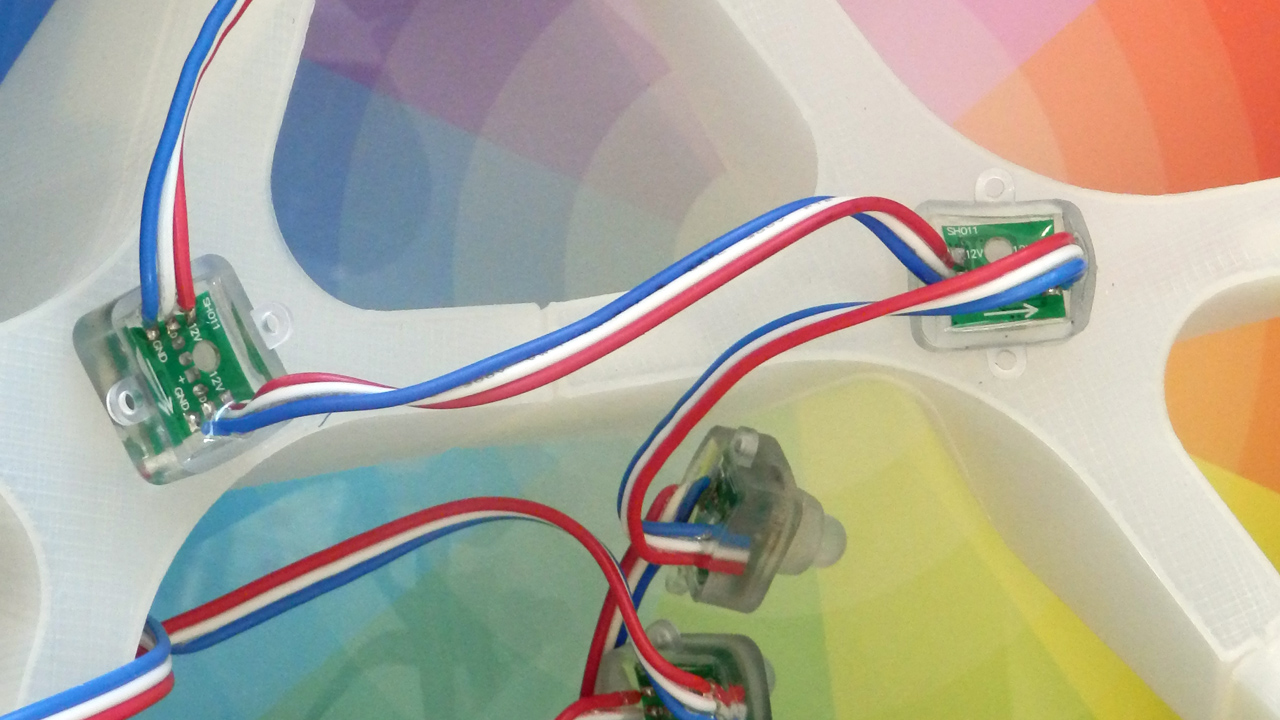
The string of LED's run one after the other, Blue is ground, Red is +12V and the input and output is White. Make sure you connect the output of your Arduino Digital 5V I/O pin (D8) into the Input (shown on the left in the image above).


Then you can fit each LED into the 3D printed modules, if they are a little tight, heat the plastic slightly with a hairdryer - they should click in and stay firmly fitted.


It's best to route them in a spiral, you can only really do it one way making sure all 30 holes are fitted.


Leave as many other LED's as you like in the chain, they would look cool hanging down or up if you are going to hang the sculpture from a rope for example.

We had a chain of 35.

This was a great learning project for and with my Daughter (10 years old).

Last year she assembled a RepRap Fisher Delta 3D printer, so this was an natural progression, Doing the 3D model design in Freecad.


Then building up the electronics and wiring the modules.

And finally programming with the Arduino IDE.

She really enjoyed it, and is already doing more projects, and investigating more uses for 'Neopixel' style LED's.


That's it!

All the files are over on Youmagine here, along with the model file to 3D print and example code for the Arduino nano to drive the LED's and some other files to experiment with the adafruit Flora.

I almost forgot to mention, I found a really great plastic filament from Excelvan for using LED's - Light piping and diffusion - it's really nice to use and perfect for any sort of LED based projects.


Please watch the video if you want to see it in action, and if you have any questions just leave a comment, or ask me on Twitter / G+ or YouTube.

Twitter - @Richrap3d
Google+ - RichardHorne_RichRap3D
YouTube Channel RichRap

Until next time, happy printing.

And if you decide to print out Project Snowflake, please let me know.

Rich.


Monday, 15 September 2014

Review of the 3D Printshow London 2014

The 3D Printshow in London had a rather fantastic mix of everything this year.


I spent three days up at the show, met lots of great people and took far too many photo's.

Kerry and the team running the 3D Printshow have such an immense job, it's almost impossible for anyone who just visits to see what goes into a show like this. Ultimate respect for the team, and next year with an even more ambitious schedule all around the world, it's going to be even more work. They are recruiting if anyone wants to take on the challenge !

I made a short but fast video & slideshow to show some of the great parts of the London 3D Printshow 2014 - I hope it gives you a taste of the way both the consumer and professional 3D Printing industry is progressing. The 3D Printshow team is off to Paris again, very soon.


I would also strongly recommend viewing it directly on YouTube as it's in HD - direct link here.

Along with the 3D Printshow team, I need to say such a big thank you to the team at Fabbaloo, who made my time at the show so much fun. We were all on the Knowledge bar stand with a mission to help anyone that asked us anything at all about 3D Printing (or anything else for that matter) - we had some really great questions and discussions this year.
One thing that's really clear this year was that people from all walks of life have figured out that 3D Printing can and will help them in one form or another. The media hype is dying down and I only had two conversations about 3D Printed guns this time!

Many questions last year started with, how does it work? what can it do? or what can it make? This year most of them started along the lines of I work in X industry and we want to use 3D Printing to help us do X, what do I need to know? - that's always a good sign that things are moving along.

Another really great signal is that lots of people wanted to know how to get involved in the '3D Printing industry', many of these were school age or about to go into further education. It's obviously not all that clear what skills you need for a career in 3D Printing. And to to be honest, as things evolve and 3D Printing takes on more avenues in various industries. Maybe it'll start to look more like an enabling tool rather than a specific industry anyway.

So many good things happened at the show, lots of great people and companies with missions and goals, shaping this industry into something really very special.

When I got home and the dust had settled, one company really stayed in my mind. They are using 3D Printing and other technology for further education and learning, with our next generation of creative minds - the kids.

But not only that. It involves parents and a wider net of influencers to show with creative technology, education can be fun and rewarding, on so many levels. That company is I can make - I would encourage anyone to take a look at what they are doing and get involved or spread the word.

Accurate sections of London Bridge - show mechanisms and construction to assist with learning and exploring the real world.

It's going to be really interesting to see where I can make takes this. If the education system responds well and also parents get involved I can see a very bright future. Very best wishes from me, and I'll do whatever I can to help.

Collaboration - 
Not all that much new technology was in force at the show this year, it was very hard to find even a single delta printer at the whole show. Yes, some new low-cost SLS machines were around. But what was happening was a clear joining of forces between companies who have been around for a little while and are starting to figure out what it's going to take to succeed in this consumer landscape.

Fuel3D and Ultimaker announced a cooperation to bundle the Fuel3D scanner with the Ultimaker 2.
Colorfabb and Eastman have joined forces and seem to be planning to take over the world :)
3D Hubs are working with a lot of people and are experts in sharing and cooperation for mutual benefit.

Lots of other things are also going or are about to happen, but I can't tell you about them at this time, sorry. It's certainly an exciting time for the industry and we have even more thrilling times ahead.

Services - 
We have always had 3D Printing services, and this year was no exception, what was more 'on-show' was a strong focus to provide more as a service. Se we still have actual 3D printing by the likes of Shapeways and i.Materialise, But many more now are offering design services, verification and a whole host of 'cloud 3D printing' - many who didn't even seem able to explain what it was they were offering. "it's cloud based" was all I got from one. I didn't ask any more.


One great UK company (with real people who care and are not up in a cloud) who has always gone that extra mile for the client is 3D Print UK if you are not already aware of them, do take a look.

3D Hubs was swarming with people for the entire show, I only managed to get to talkto them on the last day. They featured local hubs who got a chance to talk directly with the very people who they work remotely for through the Hubs network. They also announced a $4.5M funding deal to make 3D Hubs the only real choice for networked printing on the planet. Many others are now trying to get into this area. I must have had five or six different start-ups talk to me about a 3D Hubs like network of users, One even claimed to have the world's biggest network. Then re-stated we hope to have the biggest, one day. Getting people on your 'platform' is going to be a hot focus over the next year.


Art and fashion - 
Was in full force at the show. This year the organisers had hundreds of budding hopefuls apply, and they had to turn down most of them for not making the grade. It seems Artistic use of 3D Printing is now a solid form in it's own right. Fashion is still trying to work within the limits and it's doing a very good job indeed.

There was far too many fantastic works to put down here (watch the video above) - but here are a few that I was drawn too.


One of my favourites at the show was the 3Doodler dress by SHIGO - Yes, I know it's not '3D Printed' get over it, it's awesome !


Francois Veraart had a stunning piece on show - Dutch masters of dance, it's great fun and wonderful to look at.


Another one that struck a chord with me was the stunning work by Shane Hope - these pieces have so many features and detail, it's unlike anything you have seen before. It brings a whole new dimension to artwork and although I myself have done some simple 'melted Art works' before this was something else, something spectacular.

It was a real pleasure to meet Shane and talk about his ideas for future work, I'm sure you will see a lot more of Shane's work to come.
Photo's and even video do not do it justice, it's just the sort of thing you need to see in person, study, explore and feel the creation of each piece.


PussyKrew was another example of stunning computer imagery brought to life with 3D printing and lots of hard work - these prints used Ultimaker printers and hand finishing to great effect.


I just realised I want to add about another 30 more, but that's going to make this post massive, so watch the video for more amazing works.

One I can't leave out is the fantastic model of Big Ben by Mark Durbin (AKA MakeALot), Printed on Ultimaker and Delta Tower printers with Colorfabb materials. More of the scale and design in the video above.


Another personal achievement was listening and meeting Enrico Dini of D-shape (the man who prints houses) he is an inspiration for me and it was a joy to see his work and hear his story fist hand.

Other than houses, one of the things D-shape prints are these fantastic Artificial reef modules in real stone (dolomite), once in place fish and marine life take to them. 3D Printing is the only real way to make such complex structures like this.


And last but not least - What was the general Hype level? 

Quite low really... Thankfully.


The only thing that really grated on me was that all Makerbot staff had t-shirts on with the following "I CAN MAKE ANYTHING" - Any of you who were at my presentation on the Saturday of the show, would have heard my response. Hype and misleading marketing is generally not a good thing in my view. We have all worked hard to get across a realistic view of what current 3D Printing can do for people, and that's a lot already.


And I'll leave you with something not to do with 3D printing. I didn't add to the video, but has a deeper meaning to me and many more -


Here we have some stunning images of the 888,246 poppies around the Tower of London moat to commemorate and represent all the British Military Personnel who died in the first World War, which broke out 100 years ago. The last poppy will be planted on 11th November.


 Every single poppy is made in ceramic and is hand planted in the grounds, it's breathtaking.

See you next time.

Rich.