Showing posts with label failure. Show all posts

Friday, 12 February 2016

Glass 3D Print build surfaces - are not all the same - and a solution for PETG

Glass damage with PET is not fun :-(


In this post I investigated some common glass build surfaces - Starting with a little history to see how we ended up using borosilicate glass and why that's not always such a good choice for 3D Printing.

Many years ago when 3D Printing material choice was more limited than today, enormous amounts of effort went into testing and experimentation of surfaces to print on. Take one look at the RepRap forum archives and you will see that people tried almost every type of material known to man as a 3D printer build surface.

The heated 3D Print bed solved many of these issues, and many people opted for a glass surface to print on.

Over the years I have always used standard mirror-glass as my printing surface of choice. I like that you get a reflection - it's easy to see the state of your nozzle. And I found that they heated up evenly and produced fantastic results.

Over time many people have started to specify the use of borosilicate glass surfaces in 3D printers. While they do have some good properties and can be ground and polished very flat, they also have some limitations that are not always great for 3D Printing.

One of the biggest issues of borosilicate glass is that is can scratch easily, you can dig out chips with a metal scraper and generally cause damage just from normal use.

This is a stunning example of exactly the problem with PETG - Image supplied by Ante Vukorepa

I had plenty of damage - even with small parts, borosilicate glass can get chipped easily.

Often the glass chips are also almost impossible to remove from the printed part.


Borosilicate glass is also starts to get fragile when it gets damaged, and if you decide to print in PET or many of the filled materials you can take massive chunks out of your glass bed.

This problem seems to be something that has not been addressed, other than coating the nice smooth glass surface with uneven gluestick, sprays, sheets of tape or films.

I'm at the point where I no longer want to re-coat build surfaces, mess with glue or generally do anything other than clean the glass every 10-15 prints. And for the last few years using the mirrored-glass surface and some standard window cleaner with vinegar that's worked out well.

My mission was to find a universal build print surface that can also handle more materials and work with IR detection systems.

I have used PEI sheets quite successfully, but they slowly deteriorate and do not seem to like wood-filled and other filled materials.

Tufnol was a fond favorite when the first round of Nylon materials were released back in 2011, Taulman Nylons stick well to natural materials like wood, Tufnol, paper tapes and even cardboard. But they all soon deteriorate too.

Copper FR4  - PCB material works quite well, but it's hard to keep clean and oxidises very quickly.

The only build surface that seems to carry on print after print is glass. But not everything likes to stick to 'normal' or toughened glass.

Recently various surface treatments (for glass and other materials) have made it much easier to print with many different materials, but again they all have a limited life and need to be constantly re-coated or patched up. Airwolf Wolfbite is a good example of a great surface treatment I use it on glass for ABS and PCABS.

BuildTak is another good sheeting material, and for some 3D Printing plastic's is simply too strong - NEVER, ever try to print with TPU materials onto BuildTak - there is a very good chance they will bond permanently to the sheet forever.

Until I had the BigBox I always used standard mirror-glass. Unfortunately because the BigBox used an optical Infra-red (IR) level detection system you can't use a mirror surface.

Adding glue, sheets or tapes does make a difference to the IR sensing Z offset, and a change of glue thickness or a missing patch can cause issues. I specifically wanted a clean sheet of glass to print with as many materials as possible - without damage.

And that's where the trouble started. My borosilicate glass sheet started getting damaged and with the use of PETG materials became quickly destroyed with missing chunks of glass.
It's also quite easy to dig a scraper into the glass and cause a nick or scratch.

The issues are not because of bad or low quality borsilicate glass, in fact E3D commissioned an optical instrument company to custom make the sheets of flat borosilicate glass for the BigBox 3D Printer. It's an expensive, and very good quality sheet of glass!

But I want a solution that does it all, and has no maintenance apart from a quick wipe down.

I made a video talking about some of the issues, and a solution using a tempered glass protector, seems to work exceptionally well - view below or in HD on Youtube here - 


To cut a long story short - I went around the same loop again I did in 2010 testing a lot of different materials for use as a surface - Copper clad PCB (FR4) material - glass fibre sheets, sanded Aluminium, Polycarbonate, Acrylic...

I was about to buy an A4 sized sheet of toughened glass (300mm x 200mm) and I found sheets of thin glass protectors designed for tablets and phones. ('Gorilla glass' - and many copies that are basically a laminate of toughened glass and probably polycarbonate with some coatings. They are also very thin usually around 0.3mm and have a convenient silicone adhesive backing.


The silicone adhesive backing allows it to stick easily to glass without any bubbles.


The glass protector is only 0.3mm think - easy to compensate in the Z offset and still allows you to use the other side if you want clean borosilicate glass for other materials.

I was concerned that the “Oleophobic” coating they add to these sheets to stop fingerprints and repel oils and almost any type of liquid would stop the thermoplastic extrusion sticking to the sheet.


I also wondered if it would bond and not release after cooling down - or worst still totally shatter when using PET/G/T.

My borosilicate glass sheet was already damaged beyond use, so I decided to try out a toughened gorilla-glass screen protector. In hindsight this was not ideal because I now have gaps under my laminated sheet, but I'm still using one of the good properties of the borosilicate glass - that it's very flat.


Some research into common size protectors and the iPad pro was too big but the Surface Pro4 was almost perfect sized for the BigBox bed (2 ) - I found them on eBay for £7.30 (under $10). From a UK seller including free postage.


You can get the exact same thing from China for under $5 with free postage.

I believe this glass laminate sheeting protector is mass-produced in China and laser-cut to size, with various cut-outs for phones and tablet computers -  so it's possible that a keen manufacturer could have some cut to exact size for use in 3D Printing...

In short it seems to be a total success - especially for PETG materials - of any size print - in fact the bigger the better.

PLA and various filled materials all seem to stick well too.

I found that I needed to increase my heated bed temperatures by +5 degrees C and Eureka! - this works.

I didn't use a brim with the PETG materials, and some were over 150mm in size with 45% rectilinear infill - (that's nasty and would take great chunks out of my bare Borosilicate glass sheet).

Some key points - 

The the “Oleophobic” coating should last a very long time, but you need to make sure not to use aggressive chemicals or alcohol based cleaners. It's designed to be easily cleaned with just a dry standard microfibre cloth and nothing else.

I also believe that when the coating does start to vanish, that will only help other materials (like PLA) stick just a little better things - time will tell on that.

You do get slightly less stick with PLA, so for very small parts (20mm or smaller) I found that a brim was all that was required to keep them stuck. It was more of an issue with transparent PLA's I didn't see any issues at all using Opaque PLA materials.

I have not yet done any testing with Nylon or woodfilled / other-filled materials.

Other PET (G/T) based materials Like Refil, nGen, _XT and T-glase all seem to work well.


Why not use a thick sheet of toughened glass? - Yes you could, but it's often not all that flat and many 3DPrinters now come as standard with a heated borosilicate glass surface. That's great for PLA, and with a 'Gorilla glass' style protector on one side, you can still use the other side for other materials if you need.

Thanks for reading,

Please leave me a comment and get in contact. If you try out a sheet of toughened glass - 'protector' do let me know how you get on with it.

Until next time.

Rich.

Twitter - @Richrap3d
Google+ - RichardHorne_RichRap3D

Friday, 7 October 2011

The 'Art' of failure - When 3D prints go wrong and lessons from failure

Everyone has the odd bad print or failure that results in something interesting or frustrating depending on how urgently you needed the part to print.

Here are some of my failures and tips on how to avoid them and lessons learnt. (And if you can help me explain what happened last weekend to one of my PLA filament rolls I would be most interested - see at the end).

It may sound odd, but it's really essential that you fail when doing 3D printing, It tells you so much about your machine, the boundaries you can operate in and how good or bad things can be. If all you do is print with safe settings or never play with the electronics or firmware the you are missing so much of this wonderful project.

You also can't just be told what settings to use and how fast to run etc. you need to feel how your particular machine works and what it's capable of. So experiment, and when you think you have the perfect settings, turn down the extruder temperature until your filament drive fails, that's then a good reference point.
Also increase print speed until your hot-end can't keep up even with a few tens of degrees C hotter than you think you should be running, that's another good reference point.

Below are a few of my print failures during the summer, and some reasons for the failure where I know what happened.

My most common form of failure with ABS is the hobbed bolt filament transport getting jammed up.

Usually there are two reasons for this -
If you print too fast for your hot-end to keep up melting the plastic then usually after the first slower layer layer it will start to jam and grind the filament in the hobbed bolt teeth, then you need to clean it all out.

I have also observed hobbed bolt jamming from using too much extruder reversal when printing lots of small complex parts (a set of many gears for example), the extra too-and-fro on the filament can cause grinding and jamming, but not with all ABS.
I have discovered that some of my ABS needs to be printed at a slower rate to stop this from happening, other ABS I can print faster and I don't get any problems. ABS for me is generally more of a pain to print with.

Pink ABS - This failure was inadequate heating in the hot-end for the speed of solid fill - Solution for me was to use a different hot-end design so I could print faster and get better heat transfer into the filament at speed.

ABS from China Orange - Printing too fast, this part is quite hard to print, it has a very small base to secure it to the heated bed and it's quite small so it prints too-quickly.

On the left it's printed as a shell, (80mm/sec) total disaster, the warp is significant as the layers have no time to cool and they just make a mess, eventually the extruder nozzle will kick the part off the heated bed.

On the right the same part but printed with infill, and 50% slower (40mm/sec), similar problem really, the part was kicked off the bed at this point.

When you print a small object too fast it's odd watching prints that are still mostly molten they bend and move around while more plastic is added, eventually it all ends in failure.

Solution  - Print more than one part at a time, or slow down the print quite a lot, my quick solution was to print the part in PLA, it printed fine at 80mm/sec.

A few things are wrong with this print, but other than the temperature being wrong the main issue was the Y motor had not enough drive current, Solution - Increase motor current on your stepper drive.

I have yet to have a hobbed-bolt failure with Makerbot ABS, only machine failures have caused prints to fail other ABS plastic seems to have very different properties to deal with.


PLA - I love this print - A more extreme version of under current motors, the red lines on the print show where i was playing with the motor current on the steppers, at the bottom the Y motor current is low causing slip every few layers, I then turned it down and you see a regular slip every layer change, I then turned it up to the correct setting and the top printed ok. I let this print finish just for the fun of it,

And it's also an awesome demonstration of overhang! Who needs support material.

This one is the opposite problem, the X motor current is too high also causing part sheer but this is due to the stepper driver overheating and shutting down. If you can identify this is happening, you may need to use a fan on your stepper drives depending on your mechanical make-up and motor type or you may be able to reduce your motor drive current a little.

Parts that are not anchored down really well can pop-off of the print bed, causing havoc and destruction everywhere they get pushed around by your hot-end.
This extruder gear came loose and slid itself into a bigger gear and the print continued for quite a few more layers before I spotted it. 

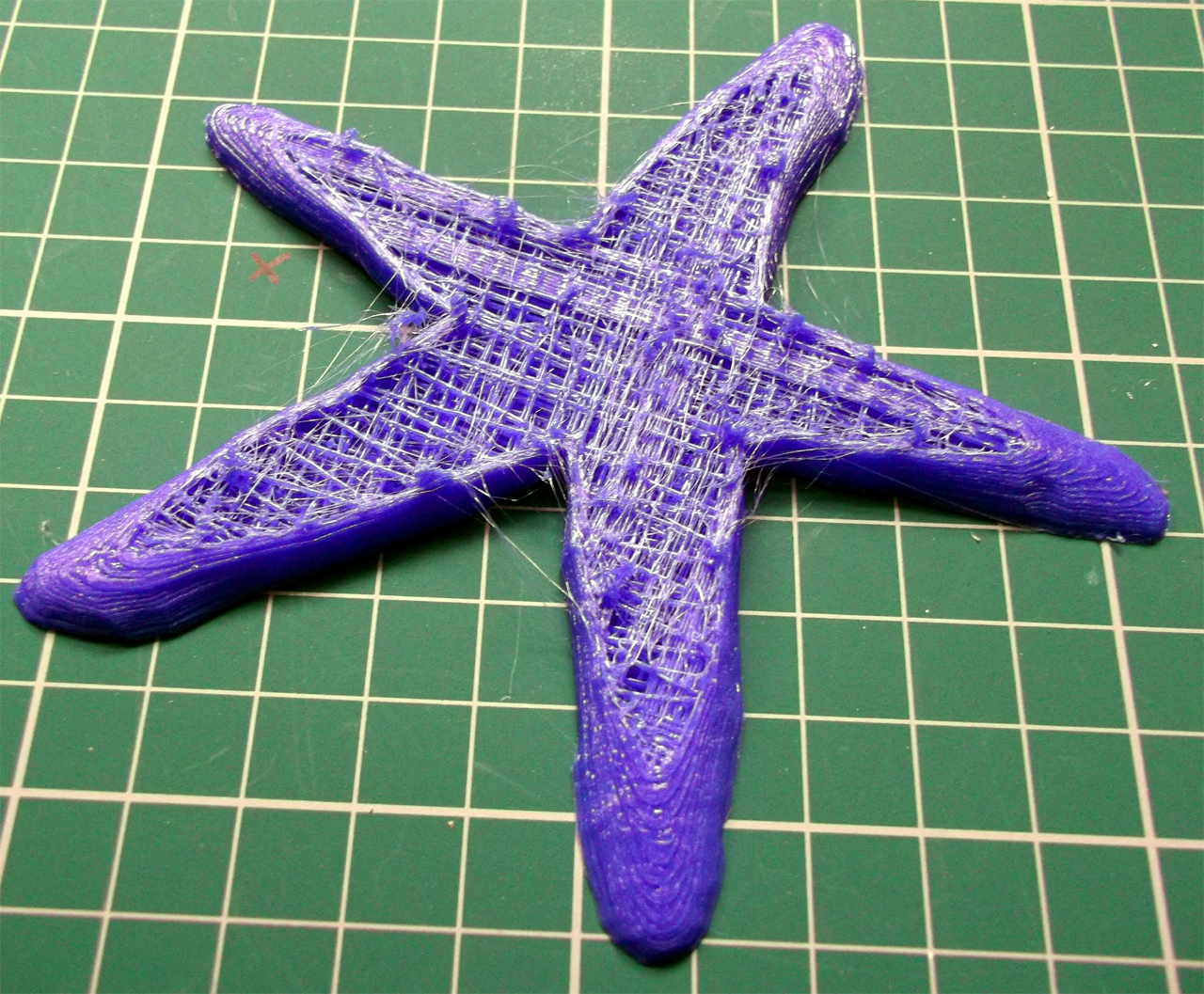
PLA Starfish, This was my fault, It just ran out of filament during the build! poor starfish.


The other thing you get in 3D printing is lots of bits and outlines, this was less than one month of evening printing.

If only we could recycle it.... one day.

Temperature - 
Temperature of your hot-end is very linked to extrusion speed and also print quality.
If you print at about 30mm/sec then a lower temperature of anything between 165 to 190 Degrees C is usually fine but as you increase temperature or speed (or both) things start to get interesting.

In this picture you can see the effect of temperature on translucent PLA at a fixed print speed.
The heated bed was 65 degrees C and the print speed is 60mm/Sec.

I started off at 205 Degrees C then increased to 215, at these temperatures the PLA starts to produce loads of tiny bubbles and gives the print a matt and frosted effect. Back to 195 and the PLA looks as you would expect.

Bonus points if you can guess what model this is (check out the reflection).

It's possible to produce nice effects on your models by altering print temperature.

Opaque PLA tends to go slightly matt at higher temperatures and low-to-normal speeds, I don't see evidence of bubbles, but it's hard to tell exactly what's happening.

When I print at over 120mm/sec I need to have Opaque PLA at +225 Degrees C, and translucent at +215 Deg C, at this speed and temperature you do not see the matt/frosted effect in the finished object, I guess that's just down to the limited time the Plastic spends in the heated chamber unless anyone can give a better explanation?

And talking of PLA and temperature - Last weekend I had a roll of PLA shatter on me!
This was one of the last rolls of China sourced 3mm PLA and it's about 4 months old, I keep them in plastic boxes and I have Makerbot Black PLA and Ultimachine White PLA rolls that are much more tightly wound than this PLA from China and they are also in the same sort of boxes, I also had Red and Yellow Chinese PLA from the same manufacturer stored in a similar way and that's still just fine. 

All my other Plastic is stored in plastic bags and cardboard boxes all the time.
Now, here in the UK we have experienced quite hot/cold weather changes for October, so I'm putting it down to that, but I still don't really understand why it happened just to this roll. Over a period of many hours I could hear the PLA 'ping' and shatter into lots of smaller pieces, very odd. It seems to have settled down and some parts of the coil are fine, even the centre section that was more tightly wound?

Hot-end Jamming - 
My only other odd failure was the jamming of hardened filament at the hot-end, this seems happen after many months of printing due to build-up of solid materials, probably because I tend to run PLA hotter and faster than 'normal' which leads me to my top-tip I'm still investigating - 
Top Tip - I would be interested if anyone else has spotted this  - If you start to see very, very fine 'hairs' of plastic on your printed parts for no real reason you can think of, this may be a sign that your hot-end is about fail, from build-up of hard material. I have spotted this on the last two times my hot-end needed cleaning, it will need disassembling and maybe drilling and cleaning out, after that it will be back to normal and work for many more months. as long as the PTFE sleeve or barrier has not degraded, then it will fail again quite quickly - keep an eye out for the 'hairs'

Some questions for you -
What's your best failure or most spectacular!
Any tips for testing the boundaries of your machine and 3D printing, please comment below -
Anyone done any 'Art' with failed prints?
Thanks for reading and go make something fail, you will learn loads!

Rich.