Showing posts with label RAMPS. Show all posts

Monday, 28 May 2018

HangPrinter Workshop with Torbjørn Ludvigsen and RepRap 10th Birthday party at E3D in Oxford

RepRap Hangprinter Workshop @ E3D with Torbjørn

In this blog post and video I'm going over how we got on at the recent HangPrinter workshop at E3D in Oxford (UK).


The HangPrinter workshop video can be seen below, or over on YouTube in Full HD on my channel here - 


I'm lucky to be only around 90 minutes away from E3D, they now have a new and dedicated unit in the breathtaking Oxford countryside. 

This is a typical view on the drive over to visit E3D - if you ever get the chance - take them up on the offer!

Their previous setup consisted of five separate workshops. A company motorised golf cart shuttled various components and completed assemblies from one to the other most days. (no joke).


Now with everything under one roof, E3D is an even more well oiled machine of innovation, development, manufacturing and thousands of orders being shipped all over the world.

I arrived at E3D a few days early before the workshop started. Torbjørn already had his Hangprinter attached to the roof of the E3D workshop. It's around 7 meters up and was a stunning sight.

I was utterly taken back with this 3D Printer, now the size of E3D's workshop and printing out a wonderful HangPrinter chair... 

Hollow chair form and HangPrinter chair (at the back) - was printing well until I 'tested' the disaster recovery feature ;)

That was until I stepped on and tripped over the lines and stopped it printing - all about 10 minutes after I first arrived! - I made a significant entrance :)

The printer tried to compensate for my unintentional 'test' but it did not manage to keep the lines from getting tangled around the spool - it was my fault, but it also highlighted a bug that Torbjørn had seen a few times before. It was the first time that day we got out the BIG ladder to sort out the spool line. It would not be the last, but we did have less crashes of people into lines as the weekend progressed.

A day later Torbjørn discovered the Mechaduino firmware had a nasty rounding error, so that bug would be tracked down and removed before the workshop even started. The V3 design is now significantly more robust at disaster recovery with that very nasty bug now gone.

The magic sensor - *Mechaduino*

The Open Source Mechaduino by Tropical Labs is a very neat little magnetic encoder board.


It's perfect for a project like Hangprinter as it has no endstops, bed probe or way to know if the print head has become knocked out of alignment.

We assembled up these onto the backs of NEMA17 motors for the Hangprinters being built in the workshop weekend. They are a far better, neater and lower cost solution to most other encoder systems available.


The Mechaduino uses a simple round magnet on the end of the NEMA17 motor shaft. That magnet (you should superglue it to the shaft) will then rotate each micro-step of the motor's movement. A multi-pole magnetic encoder will detect the exact orientation and know if a motor has skipped steps or if force is being applied (torque mode).


Once the mechaduino is assembled, the internal firmware (running on a 32bit ARM cpu) calibrates the rotation of each motor individually. This is required as the magnet may be aligned slightly differently, or the distance from the sensor may be variable. After calibration, you can mark up each motor with an Axis and also give them a unique address. This is so the modified Hangprinter Marlin firmware can communicate to each one connected to the bus.

Preparation for the workshop - 


We had plenty to do before the workshop participants arrived the next day, Torbjørn and I set about with as much pre-assembly as possible to make it a more straightforward build schedule.


Basic assembly done, we left all the interesting build assembly steps to the participants.

That included, firmware, software and application setup on their laptops.

Measuring and wrapping lines around the HangPrinter pully gears.

Assembly, soldering and wiring up.


Wiring was the most time consuming, we could have saved around four hours if a pre-made wiring loom was available for the Hangprinter system - that's one for next time or anyone else that's thinking about running a 3D Printer workshop.

After some final assembly and a pre-flight check that everything worked. It was on to the calibration of the Hangprinter.
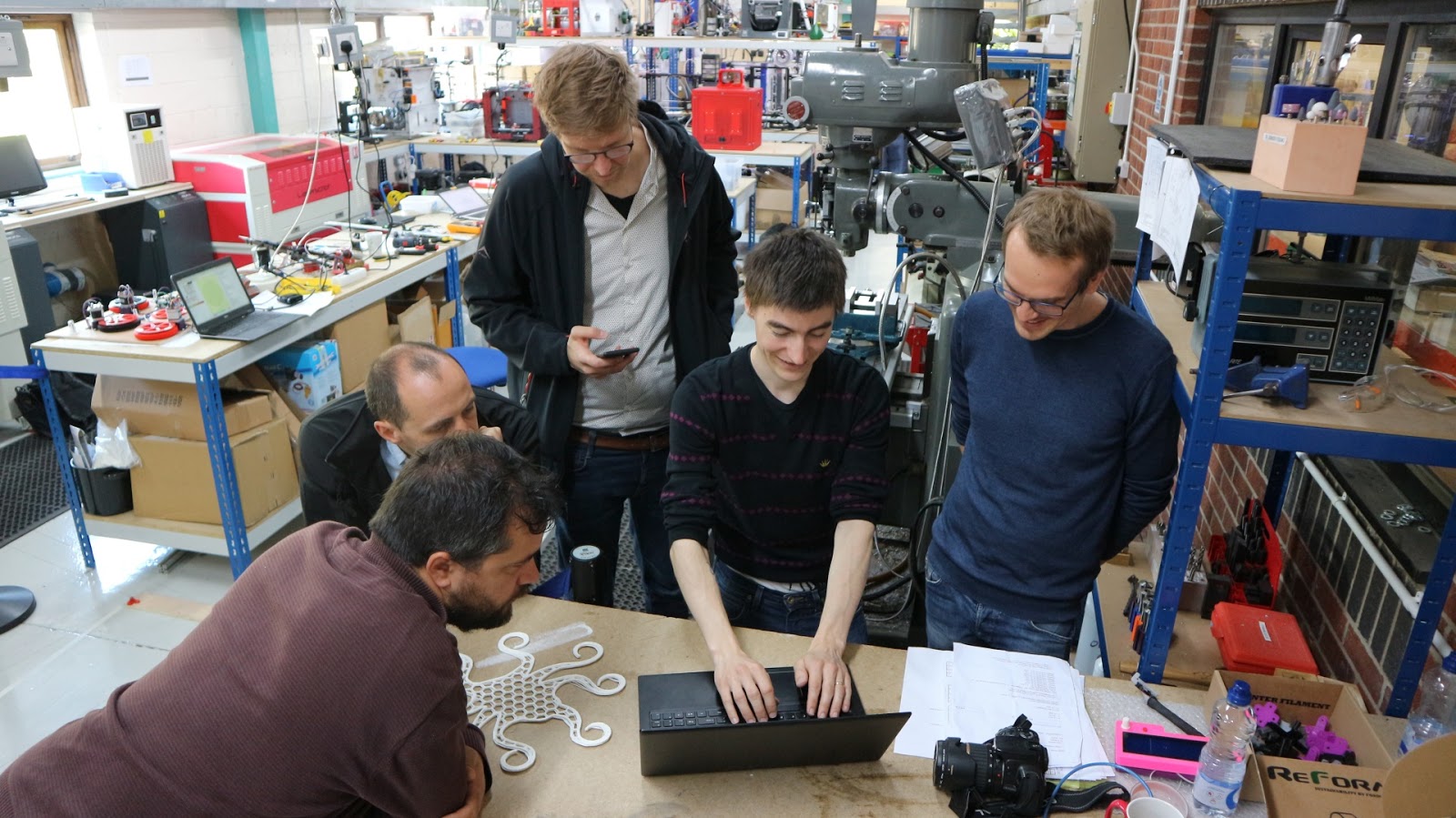
Auto-calibration of the build space is one of the most impressive aspects of HangPrinter - and only possible by the Mechaduino drivers and encoders.

You basically turn on 'Torque mode' and walk the print effector around the build volume - a script takes data points and maps out a calibration of the build volume. 


You can check the calibration - shown above it was millimetre perfect!

You finally then just set the print nozzle onto the build platform and register a zero Z position, switch out of torque mode and can shortly start a print. Above Sanjay from E3D is checking out the test print from the SuperVolcano hot-end and 1.2 mm nozzle.

The lines were tightened and print quality significantly improved. This turned out to be a very nice print.


During the workshop, I setup the HangPrinter portable frame - still a very large print area, but tiny when compared to the ceiling mounted V3.

The 'portable' uses a slightly smaller configuration for the motor plate, and three arms to form the frame.

These are all still 3D Printed parts for the frame sections to join. The top mounts are hinged for even more portability. (it all fitted into my car as an example).

The extruder mount fits onto the effector, I have made various mounting plates, above for the Bondtech extruder, and another for the E3D Titan Aero.

A short while later, I manages to string the machine and get it all set up for it's first 3D print.


I did not calibrate the portable Hangprinter. All the calculations for the firmware setup were made from the cad drawing of the built machine. This proved to be good enough for a first print, but some real-world calibration was

Amazingly it all worked the very first print. It was over-extruding, and the lines were a little loose, Z height calibration was not correct (my fault in the cad file - not allowing for a lower build platform).

But not a bad first print.

The lines you can see on the build platform were used to get a centre point (by hanging the effector on the D lines) and also to align up the A, B and C lines to the A frame mounting points.


We all then stopped for a special RepRap Birthday celebration - 10 years of Replication!


Special guests.


Lots of 3D Printing talk and ideas :)

And you can't have a party without a cake !


Happy Birthday RepRap !

Adrian Bowyer checking out the test Octopus print on the Hangprinter V3 installed at E3D - Image by Sally Bowyer of RepRap Ltd. CC BY-SA 4.0 Original image on Instagram here


The workshop was a wrap, we had a lot of fun and now even more HangPrinters are ready for printing.


Thanks Torbjørn - we had a great and successful 3D Printing workshop. I hope more people run them and the HangPrinter becomes even more popular.

Torbjørn continues with the Hangprinter project, and I'll be also setting up my machine for further experimentation and development. Stay tuned for future updates.


Almost all the parts (including many spares) for the Hangprinters were printed on my newly built Prusa i3 MK3 - A few were also printed on the MK2 as a comparison of quality, speed and accuracy.

A build video (with my daughter) and thoughts on the MK3 machine will be coming up in a future video and blog post.

HangPrinter Portable - 
If you have an interest in the 'HangPrinter Portable' I made for the workshop, leave me a message of ask me about it over on Twitter. I'm planning to make a few changes to the top mounts to be more solid, but then I would be very happy to post the design files, firmware configurations and 3D Printed components for this version if anyone is interested?


Thank you ! -


I had a great time working with Torbjørn, we were also very lucky to have access to the brand new E3D workshop - tools, components and lots of help from everyone! - Our thanks to everyone involved and the entire team at E3D for helping to make the workshop weekend a really great success.

If you want to find out more about the amazing HangPrinter project, please visit - http://www.hangprinter.org/

Version 3 HangPrinter Forum thread is here - http://forums.reprap.org/read.php?1,792937

GitHub Source for HangPrinter is here - https://github.com/tobbelobb/hangprinter


Thanks for reading, see you next time.

Rich.


Please join me on Twitter @RichRap3D

My profile and posts over on Google+

Files and designs shared on YouMagine

Files and designs shared on Thingiverse

Files and designs shared on GitHub

Files and designs shared on Repables 

My Youtube channel is here, all 3D Printing in Hi-Def video content.

Wednesday, 31 August 2011

* Pimp my Mendel * - How to build up a LM8UU Linear Bearing Prusa

Mendel Bling is built up and running better, smoother and faster than I imagined possible.

I decided to make the Bling machine build to be a complete as possible manufacturing solution and also add a few upgrades and ease of use changes along the way, let me know what you think. It’s also a full linear bearing (LM8UU) design on all the axis.


I’m also going to use this as a *basic* overview ‘How to build a Prusa Mendel’ post, hopefully it will help someone or at least give you some ideas for your own build.
I does not cover every step, just highlights many of the main assembly points.

Frame Vertex -
My frame vertexes are a little chunkier than the normal Prusa versions, the only thing to make sure is that you have the same measurement between all frame vertex plastic faces, so if that’s 250mm like the ‘official’ Prusa or 252mm or 246mm like mine then that’s fine, just make sure they are all the same.

Axis lower frame Assembly.
Axis lower frame back with Y motor mount.
X-Carriage - 
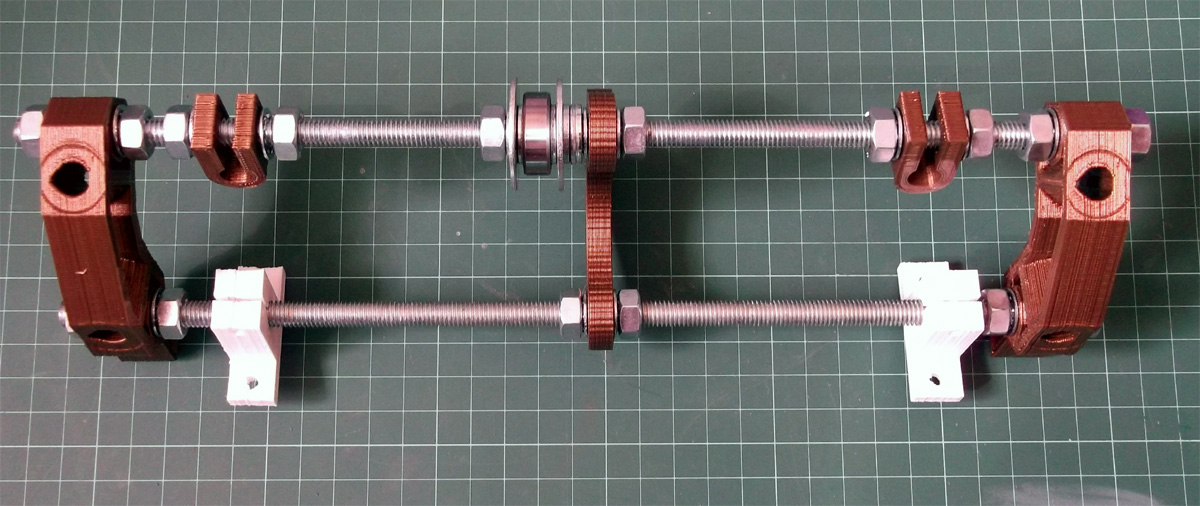
This is Greg's X carriage fitted with 3 x LM8UU Linear bearings.

The X carriage assembly with Z ends –
Both the Prusa Z ends are a tight push-fit, I recommend wrapping just the end of the bar in Kapton tape then slightly softening the plastic before pushing it in and holding the plastic in compression against the bar until it goes cold and sets, the wrapped Kapton tape will make it impossible to remove without re-heating, so make sure you push the bars all the way into the Z end, and do one end at a time.

REMEMBER to slide on your X carriage with it’s Linear bearings before attaching into the push-fit ends of the Z axis parts.

Y stage –
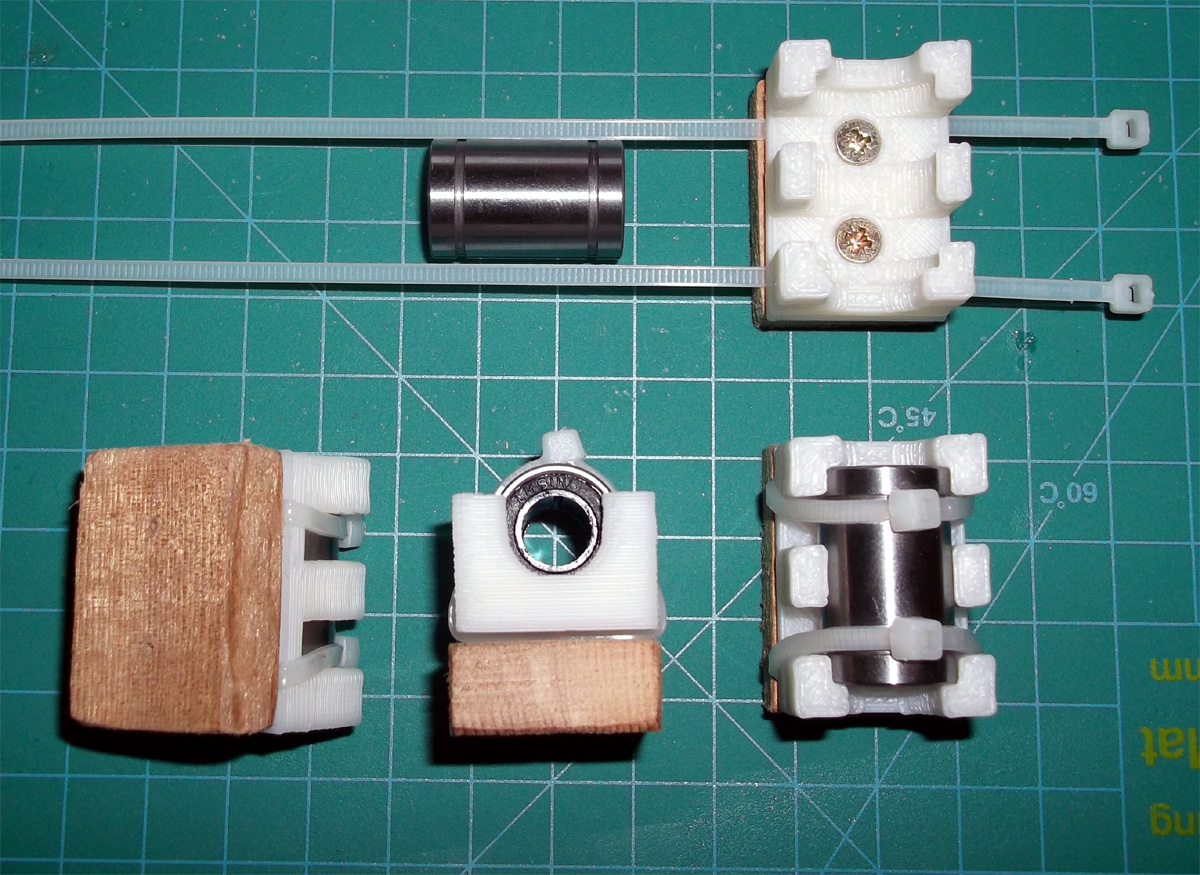
If you use Greg’s LM8UU Y axis holders then assemble them in a similar way to this, there are other variants (Joem_)that have mounting lugs etc. so take your pick.

Slide them (carefully) onto the Y stage bars and space them on your frame.

So after making sure your Y axis bars are parallel, straight and spaced appropriately you can screw the Y plate onto your Linear bearing holders.

Keep going, in a short while it will start to look something like this.

The Print bed –
I slightly modified the MDF print bed by adding small wooden bars at both the Y axis ends and spray painting it with high temperature paint, you don’t need to do this, I just wanted to eliminate any flex and also have a slight lip in the Y axis direction to stop extra air movement under the bed and also over the top of the heated surface.

I added a sheet of Aluminium foil 
And then a cut sheet of silicon (kitchen baking silicon)
After this if you can get hold of it (£1 from you local pound shop) I added a sheet of PTFE cooking mesh, this stuff is great, 260 Degrees C rated. Lightweight thermal isolation and insulation for your heated bed.


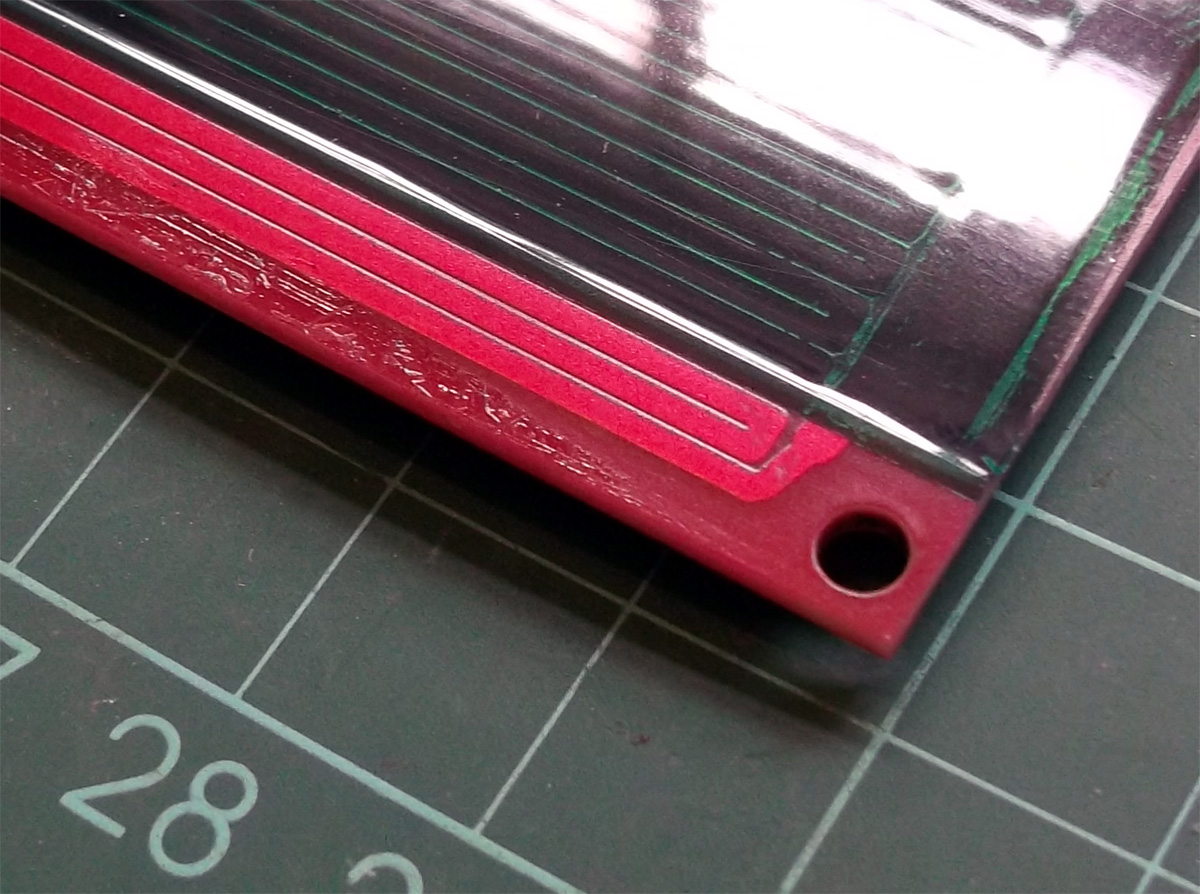
The heated bed is a normal Prusa FR4 PCB; I’m going to use it upside down with the heating tracks on the top surface, so to protect the tracking and smooth it out I covered the bed in PET tape.
Top TIP – Adding the Tape (PET or Kapton) to this side of the PCB has another major advantage, any air bubbles trapped when you put the tape on make their way down the gaps in the tracks so you end up with a really nice surface, bubble free.

If you use the other side it’s not easy so apply the tape and you still end up with an impression of the PCB silk-screen printing text appearing on all your printed parts!

The stack of Alu foil, silicon sheet and PTFE mesh will give you a gap between the MDF and heating PCB, so you need to make sure you have the same spacing or a little more for the four mounting points.
Here I have used M3 stainless steel bolts, nuts and a PTFE washer to get the correct spacing.

Z Motors-
The Z drive motor connections are Nophead’s design, these work well and only need a small section of plastic tube around the motor shaft, heat it up if it’s tight to fit onto the shaft.
These should be done up tightly around the motor shaft and the M8 studding using all four bolts on each.

Z stage –
To install the Linear bearings into the Z stage you may need to heat the plastic slightly, it makes it a little easier to click them in and you can make sure they ‘set’ tightly in place and in alignment if you also use a M8 rod while you fit them in place. Secure with ty-wraps.


The motor mounts for the Z stage are both designed to have 4 bolts connecting the motors tightly down, no one actually seems to use these and it is preferable to ty-wrap the Z motors in place to allow them to ‘decouple’ mechanical wobble from Z movements.

I started by only securing with 2 bolts and using PTFE washers, but after a few prints I also ended up using ty-wraps so the motors are floating other than being held in place with ty-wraps.


The next time I take it apart I will also put a sheet of silicon in between the motors and the mount to further decouple any vibrations.

Also when you install the Z motors and the very straight M8 studding remember to add a spring inside both sides of the hexagon sections, it should be under compression between the top and bottom M8 nuts so when you do Z moves it reduces backlash to an absolute minimum.

I also added Rod stabilisers to my machines top and bottom of the Z drive rods.

I think they do help support the Z transport very well and help with vertical alignment, but you don’t really need them.


Belts and pulleys -
I have used off-the-shelf Metal pulleys this time as it’s using the 2.5mm belts and I didn’t have time to cast more of the fine pitch pulleys, I also wanted to see how tricky it was to drill and tap the metal pulleys, it’s not hard, anyone with a drill press and a simple hand tap could do it.

Top left shows how they come, you need to drill them out and add another hole for the grub screw and tap that with M3

Attach the pulleys to the motor shafts and use a good quality grub screw to keep it in place.


Greg’s X carriage has an in-built tensioner system.


Install the Y belt and if you keep the Y belts long enough so you can pull, adjust and tighten them even after the build platform is on then you should not have to disassemble anything to tighten belts in the future. 
I just taped the spare ends down to keep them tidy.

The extruder is Greg’s design along with my own Fan duct mounted on the X carriage.


The hot-end heater block is my version here - 

Electronics –
I’m not going to explain how to make up the electronics here as there is very good documentation on the Wiki and also everyone seems to have a different preference with electronics and there are so many variants.
I did have some new (at the time) RAMPS 1.3 PCB’s but I decided to use up the last 1.2 PCB I had as they are not very different in reality.

I plan to use the 1.3 Versions in a future dual extruder machine that will look quite different to this machine.

I’m housing the wiring and electronics in a simple ABS case (175mm x 110mm x 66mm).


Neat wiring and cable identification is a good thing to make it easier in the future.


RAMPS installed and some of the stepsticks for testing.

Make sure you have nice chunky wires and good crimps for your +12V power connections to the electronics.

RAMPS V1.2 does not have a separate Poly-fuse for the Heated bed, This one is 11A rated and connected separately to another set of +12V wires from the ATX PSU and then on to the heated bed, the return from the heated bed goes to the H-bed MOSFET sink (GND) on the electronics.

These are simple mechanical endstops to my own design, but you can use whatever switches you have or opto-endstops if you prefer.

I added a few LED indicators so I can see when the power to the system is on, the heated bed is active and the hot-end is being driven, I recommend doing this it tells you a lot about how your system is working and is nice to check things happen when you expect them.

When running from SD cards it’s always nice to be able to quickly remove the card to update Gcode, so I decided to extend the SD cable to the outside of the enclosure in an easy to access spot. 
To do this I simply used a cut-down Ribbon cable (an old PC Floppy drive cable) and fitted a male connector so I can fit the SD card adapter. I have not had any problems doing this, but keep this ‘extension’ as short as possible.

I’m using Stepstick motor drivers in this machine, they are almost identical to the Pololu versions, and in the photo you can see both the Pololu (top left) and Stepstick below.

Think about cable strain relief and give yourself plenty of cable to allow free movement especially on the Z axis and the extruder assembly.
Added an on/off switch for the ATX psu (this is on the low-voltage side, instead of just wiring it to ground to get the ATX to turn on), it can be classes as a panic button also as it will shut down all motors and heated things.

To mount everything and as a frame for a filament spool I use some 20mm T-slot Aluminium, you could just as easily use wood or threaded bar for this ‘extension’. The Mendel is fixed to this via 4 x 8mm printed plastic mounts at the base and two small M8 threaded rods for extra stability using the normal Mendel mounting plate at the top. The electronics box and ATX psu are all mounted to the t-slot frame.


At the very top there is space for a standard 30cm filament spool using another M8 threaded rod. This means the whole thing can be picked up and easily moved all you need is power and a USB cable that can also be removed after you set off a print using the onboard SD card.

Finally four rubber feet to minimise vibration and noise .

Software and firmware is your choice, and many more are on their way as I write this, I’m using Sprinter and Printrun (Pronterface) along with Skeinforge V41 but people are starting to use SFACT, I just had a quick go and it has much easier to understand names for the settings, and a lot less ratio's, so be sure to check it out.

First print.
It’s first print was successful and it went on to print all my multi-coloured things a few posts back.
It’s now going to be hard at work making more stuff and of course a grandchild…

Thanks for reading, I hope it was useful.

Rich.