I have had the most frustrating last four days, 4 Nozzle jams! 4 of them! Arrrghhh! and I have finally worked out what was causing it, it was not the hot-end or the electronics. I'm too annoyed to write it up now, but I'll do a post tomorrow with an update.
Oh and before all the nozzle jams I did manage an easier to print Pikachu for #30DoC day 14. I should be back on form tomorrow, lots of Ideas, little time.
Rich.
Monday, 18 June 2012

Wednesday, 13 June 2012
Mini - MendelMAX - #30DoC days 11,12 & 13
I'm getting a little behind Blogging my 30 days of creativity ( #30DoC ) updates, but it has still been going on.
Believe it or not, I do work full time, so getting any time for RepRap is actually extremely tricky, and the daily updates have been getting later and later, so I'm going to blog a few days at a time until the end of the month if I can actually manage to stick it out that long!
One thing this has taught me is that I really enjoy writing up my ideas, developments and adventures with RepRap, but I prefer to do it after a good long session of work rather than every day...
That said, I do think it's pushing me to get around to starting all the many things I have had on my RepRap list for so long. I may not get them finished or even working, but a start is better than nothing, so I'll continue to blog ideas as I think of them and hopefully take a few of them all the way to complete solutions or working prototypes. I also think it may help as I have had so many comments, suggestions and people contacting me with similar ideas, that it's convinced me that a few smaller updates are better than one big one when the project's finished - let me know what you think?
Mini - MendelMAX -
Recently I have had a need for a smaller machine, that's rock solid, and prints mainly smaller parts with a finer nozzle and 1.75mm filament, so I decided to build up the parts into a mini sized MendelMax (as I had initially planned many months ago, when I built up my first MAX)
 Mini MendelMAX - small but great. - progress so far after 3 evenings building up.
It's not all wired up and without electronics or power at the moment.

I printed this set of parts last month, but didn't get around to deciding on a build for them, it's based on the MendelMAX V1.5 and some excellent derivatives I'll talk about below.
The lower vertex sections are the integrated design by Jib there is even a triple height version now!
 The Awesome printed Y axis is by tommyc - LM8UU Y carriage for MendelMAX, and I love this design.

 I'm planning for this to print in both PLA and ABS, so I have made my own smaller heated bed with resistors and PCB Material.
 I will be using the little quick-fit 'Huxley sized' extruder on this machine.
 The new MendelMAX Y mentioner is really handy, as you can make your belt a little tighter just with a quick turn of the screw on the front.


 The only other mechanical change I made was to add some little PTFE end-caps to the threaded rod ends, this helps stop them wobbling around and reduces noise.
I also wanted a small printer robust enough to carry around to events and meetings, this should do the trick, it's going to be bomb-proof.
I'll let you know how the rest of the build goes, and also how well it prints.
Thanks for looking.
Rich.
Believe it or not, I do work full time, so getting any time for RepRap is actually extremely tricky, and the daily updates have been getting later and later, so I'm going to blog a few days at a time until the end of the month if I can actually manage to stick it out that long!
One thing this has taught me is that I really enjoy writing up my ideas, developments and adventures with RepRap, but I prefer to do it after a good long session of work rather than every day...
That said, I do think it's pushing me to get around to starting all the many things I have had on my RepRap list for so long. I may not get them finished or even working, but a start is better than nothing, so I'll continue to blog ideas as I think of them and hopefully take a few of them all the way to complete solutions or working prototypes. I also think it may help as I have had so many comments, suggestions and people contacting me with similar ideas, that it's convinced me that a few smaller updates are better than one big one when the project's finished - let me know what you think?
Mini - MendelMAX -
Recently I have had a need for a smaller machine, that's rock solid, and prints mainly smaller parts with a finer nozzle and 1.75mm filament, so I decided to build up the parts into a mini sized MendelMax (as I had initially planned many months ago, when I built up my first MAX)

It's not all wired up and without electronics or power at the moment.

I printed this set of parts last month, but didn't get around to deciding on a build for them, it's based on the MendelMAX V1.5 and some excellent derivatives I'll talk about below.
The lower vertex sections are the integrated design by Jib there is even a triple height version now!


I disassembled my earlier frame made of green PLA-V1 MendelMAX parts and replaced them with shiny new Gold and black parts. All the black parts including the Y carriage and Quick-Fit X are made with RepRapsource ABS, all the other parts are printed with Faberdashery PLA.


The lower Motor mounts work very well, and just make the machine even easier to assemble.
For the Z Axis I decided to stick with theM6 threaded rods, they work so much better than M8, this machine will not be doing very high printing, but it will be doing very low layer heights, so M6 being 1mm pitch is a good choice.

The only thing I'm changing is by using an M6 studding connector instead of two M6 nuts, I think this should give me a little more stability, and a little more friction to deal with.

I also wanted a small printer robust enough to carry around to events and meetings, this should do the trick, it's going to be bomb-proof.
I'll let you know how the rest of the build goes, and also how well it prints.
Thanks for looking.
Rich.
Sunday, 10 June 2012
123 Counting Fun for Kids - #30DoC Days 9&10
Day's 9 and 10 of my 30 days of creativity ( #30DoC ) involved my Kids, they are always such a massive source of ideas and creative opportunity. We have been doing numbers and basic maths recently with them, using the normal flash cards and coins. They are still not visualising numbers all that well so I decided to try and design a basic set of counters that could form games and number play before bedtime.


The main board is 150mm x 150mm so fits on a Prusa Heated bed, I also used this model to test out the 'Brim' idea to stop warping, see below-

The 'Brim' as proposed by Idolcrasher here uses the normal outline that's used to prime the extruder, but given 0mm distance from the part and with more outlines makes a 'Brim' on the border of the thing being printed. the only down-side is that it does not hug the outline of the printed object especially if you print more than one thing at a time.

This was a very large single print, but I was impressed with how level and smooth the first two layers went down, this was quite a mesmerising print to watch, build up, I almost watched the entire thing for over an hour.


Very Pink!

The files are up on Thingiverse here, if you fancy printing a set or improving it.
Thanks for looking,
Cheers,
Rich.
Friday, 8 June 2012
RepRap Printing Competition - #30DoC Day 8
I have the excellent job of judging the RepRap Printing competition this week. So for Day 8 of my 30 days of creativity ( #30DoC ) as this is the last day in the competition I thought it was only fitting to share all the amazing creative work done by everyone who entered this week, I have been totally stunned with all the great prints, effort and advice this competition is bringing to the RepRap 3D printing community.
And I'm doing this blog post to help me collect the results so it's easier to see all the great work, and it should make the job of judging a little easier.
The Challenge! -
Was to print a half sized & quarter resolution version of the great Voronoi D Tower - Math Art by @Dizingof I made a Derivative version to print here on Thingiverse and my original Forum post to start the competition is Here.

Dizingof's Math art is a stunning collection of very hard to print, but amazing models that use mathematical algorithms to generate 3D structures. I didn't realise at the time when I selected this model for the competition that is had a particular connection to RepRap. The inventor of RepRap - Adrian Bowyer pointed out that this particular model is using 3D Voronoi structures and Adrian apart from being famous for RepRap is very famous for the Bowyer-Watson Algorithm, which is one of the standard ways of computing multidimensional Voronoi diagrams.
No Rules this week *
* You can use my Derivative or the Original version or print it at a different size to my derivative, just make sure you state what size and version it was and whatever speed and layer height you like.
The Entries -
Photos, details and images below are by their respective entrants in the competition.


Retraction: 2 mm len, .5 mm lift, 25 mm/s speed, 0 extra len, 2 mm travel after retraction
Print Settings: 3 perimeters, 4 solid layers .25 fill density, 45 deg fill, rectilinear fill and solid fill patterns, random starting points, Cooling fan on extruder
Printer: .5mm nozzle, Mach3/EMC gcode
Filament: 1.69mm, 1 multiplier, 205 deg C extruder, 110 deg C hot bed
Print speed: 20 mm/s perimeters, 15 mm/s small perimeters, 60 mm/s infill, 30 mm/s solid infill, 20 mm/s bridges
Other speed settings: 300 mm/s travel, .5 bottom layer ratio - Took 1 hr 58 minutes to print.


WoW! I hope I didn't miss anyone out, what an amazing collection of prints, machines and settings, I love them all.
The wonderful people over at Faberdashery are offering a £40 voucher to spend at www.faberdashery.co.uk on their Awesome PLA for the winner again this week!
I'm really thinking we will need a dedicated section for Competition printing, Maybe we can talk nicely to one of the RepRap Admins to get us a dedicated forum under fabrication?
And it true competition style, I'm going to sleep on the decision, so I'll update with the winner in the morning. Thanks to everyone that entered this round, make sure you enter again next week for more challenging fun!
*EDIT* -
The winner this week -
It was a very close competition this week and a difficult decision, but after reviewing all the entries I'm going to select billyzelsnack as this week's winner.
Billy's entry made me think and really stuck in my mind - it was printed with the Printxel, one of the lowest cost RepRap printers currently available. And the fact is was done with quite thick layers (0.33) and all the holes came out so well is a great achievement, the base is very good and it made me checkout the Kisslicer, very impressive.
I'm also highly impressed to see so many excellent ABS prints, especially benosteen done without a heated bed! so that get's a 'highly commended' award and almost pipped Billy's entry to the winning spot.
Over to you Billy - select us a good challenge for next week, and enjoy your great Faberdashery filament.
I would recommend starting a new thread for each week's competition, now that we have a dedicated forum section - thanks Rhys for setting it up.
*EDIT* -
Thanks for reading everyone,
Rich.

And I'm doing this blog post to help me collect the results so it's easier to see all the great work, and it should make the job of judging a little easier.
The Challenge! -
Was to print a half sized & quarter resolution version of the great Voronoi D Tower - Math Art by @Dizingof I made a Derivative version to print here on Thingiverse and my original Forum post to start the competition is Here.

Image by @Dizingof
Dizingof's Math art is a stunning collection of very hard to print, but amazing models that use mathematical algorithms to generate 3D structures. I didn't realise at the time when I selected this model for the competition that is had a particular connection to RepRap. The inventor of RepRap - Adrian Bowyer pointed out that this particular model is using 3D Voronoi structures and Adrian apart from being famous for RepRap is very famous for the Bowyer-Watson Algorithm, which is one of the standard ways of computing multidimensional Voronoi diagrams.
No Rules this week *
* You can use my Derivative or the Original version or print it at a different size to my derivative, just make sure you state what size and version it was and whatever speed and layer height you like.
The Entries -
Photos, details and images below are by their respective entrants in the competition.
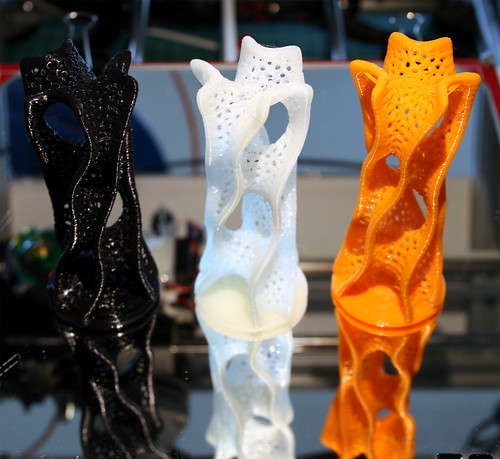
Me, (RichRap) - Just to get some printing ideas going - Slic3r and Skeinforge prints, one was without any retraction at all!

Leeway - Gold PLA print, no Heated bed
.2 layer height, 3 perimeters and solid fills @45%. Sliced with Slic3r 0-8-2. Temp. 180 C
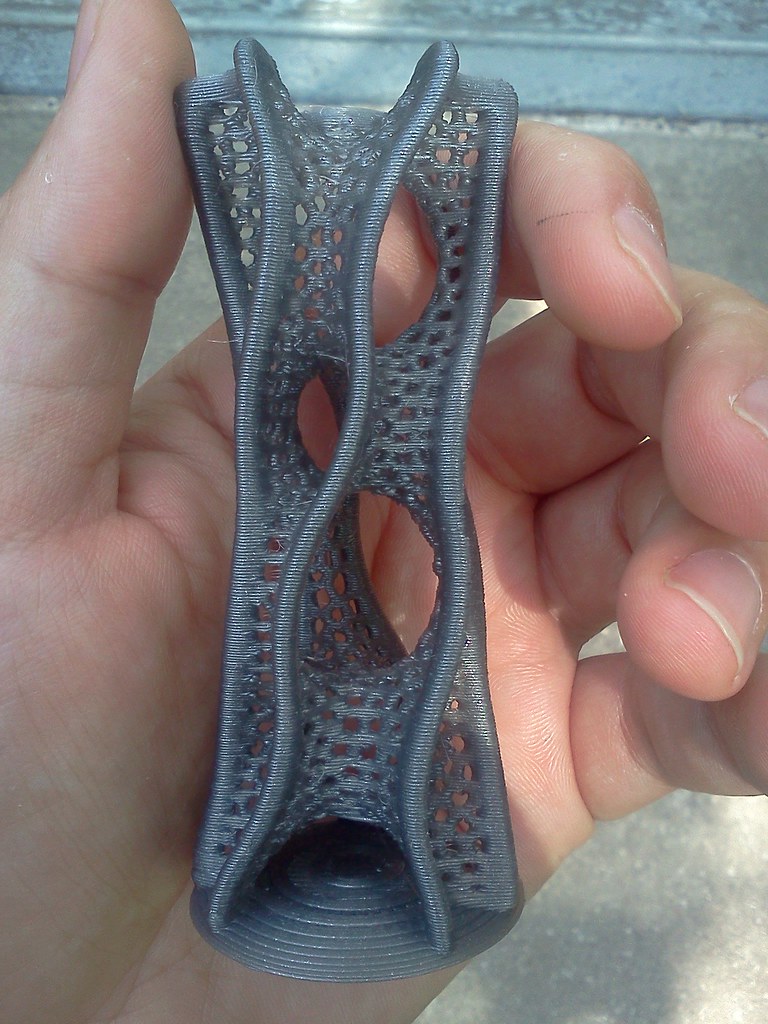
billyzelsnack - Printxel. KISSlicer 0.33 layers. Overhead 40mm fan. 20mm/s. 2mm retract. 25mm/s retract speed. 10mm wipe. 1h18m estimate. 1h57m actual.

mhackney - Sliced in Slic3r 0.8.2
Accuracy: .2mm layer height, 1 first layer ratio, infill every 1 layer Retraction: 2 mm len, .5 mm lift, 25 mm/s speed, 0 extra len, 2 mm travel after retraction
Print Settings: 3 perimeters, 4 solid layers .25 fill density, 45 deg fill, rectilinear fill and solid fill patterns, random starting points, Cooling fan on extruder
Printer: .5mm nozzle, Mach3/EMC gcode
Filament: 1.69mm, 1 multiplier, 205 deg C extruder, 110 deg C hot bed
Print speed: 20 mm/s perimeters, 15 mm/s small perimeters, 60 mm/s infill, 30 mm/s solid infill, 20 mm/s bridges
Other speed settings: 300 mm/s travel, .5 bottom layer ratio - Took 1 hr 58 minutes to print.

benosteen - 0.25mm layers in natural cream ABS.
On tape prepped w/ a layer of glue (no hot bed or fan)

Hoani.cross - Printed in 1h45min
[*] 0.3mm layer height
[*] 20/40/60mm/s for small perimeters/perimeters/infill
[*] 1mm retraction length at 7mm/s with 0.3mm z-lift
[*] 70% line infill
[*] 2 perimeters, 3 solid layers
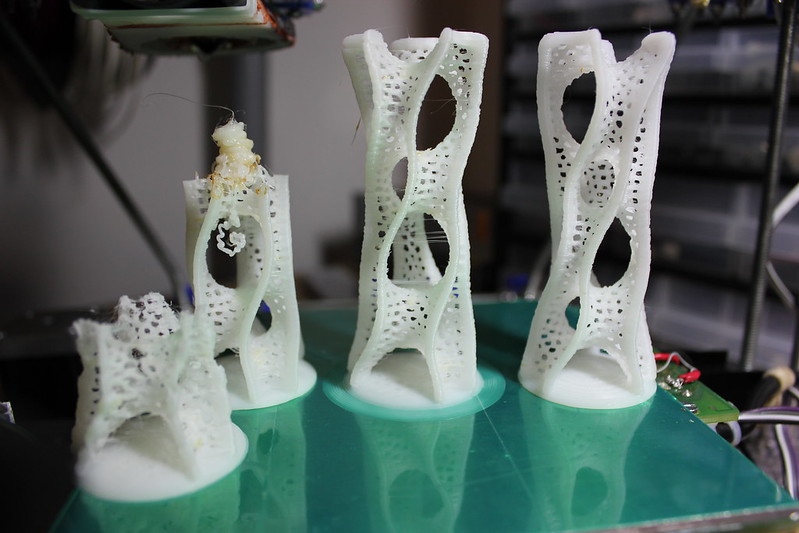
Hoani.cross - 2nd Try and failed attempts (Really great to also see the failures! thanks)

PharoahsMummy - Print time: 1h:25m
Material used is ABS, heated bed was on at ~110C and nozzle running ~210C.
Almost no to little cleanup.
SeeMeCNC H-1.0 kit
Slic3r settings:
; layer_height = .20
; perimeters = 2
; solid_layers = 4
; fill_density = .25
; nozzle_diameter = 0.50
; filament_diameter = 1.8
; extrusion_multiplier = 1
; perimeter_speed = 20
; infill_speed = 20
; travel_speed = 120
; extrusion_width_ratio = 0
; scale = 1
; single wall width = 0.70mm
Slic3r settings:
; layer_height = .20
; perimeters = 2
; solid_layers = 4
; fill_density = .25
; nozzle_diameter = 0.50
; filament_diameter = 1.8
; extrusion_multiplier = 1
; perimeter_speed = 20
; infill_speed = 20
; travel_speed = 120
; extrusion_width_ratio = 0
; scale = 1
; single wall width = 0.70mm

By Bean - In PLA

Euhedral -
Printed on an orca 0.40 in PLA.
No cleanup.
Took 2.5 hours to print.
; layer_height = 0.2
; perimeters = 3
; solid_layers = 4
; fill_density = 0.125
; nozzle_diameter = 0.35
; filament_diameter = 1.7
; extrusion_multiplier = 1
; perimeter_speed = 20
; infill_speed = 75
; travel_speed = 500
; extrusion_width_ratio = 1.535
; scale = 1
; single wall width = 0.31mm
No cleanup.
Took 2.5 hours to print.
; layer_height = 0.2
; perimeters = 3
; solid_layers = 4
; fill_density = 0.125
; nozzle_diameter = 0.35
; filament_diameter = 1.7
; extrusion_multiplier = 1
; perimeter_speed = 20
; infill_speed = 75
; travel_speed = 500
; extrusion_width_ratio = 1.535
; scale = 1
; single wall width = 0.31mm

Guillem Tena (RepRapBCN Team) - printed with ABS in a Prusa Mendel 
It is sliced on Slic3er 0.8.2.
We choose an accuracy of 0.2mm layer height as slic3r had problems slicing at 0.15mm.
For the construction we put two towers side by side in order to enable each layer to cool easily.
The temperature for the estruder was 222ºC on the first layer and 220ºC for the rest, and 80ºC for the hot bed during all the construction.
The print speed have been quite slow, by 20mm/s on the perimeters, slowing it down on the small ones to 15 and 30mm/s on the infill.
We choose an accuracy of 0.2mm layer height as slic3r had problems slicing at 0.15mm.
For the construction we put two towers side by side in order to enable each layer to cool easily.
The temperature for the estruder was 222ºC on the first layer and 220ºC for the rest, and 80ºC for the hot bed during all the construction.
The print speed have been quite slow, by 20mm/s on the perimeters, slowing it down on the small ones to 15 and 30mm/s on the infill.
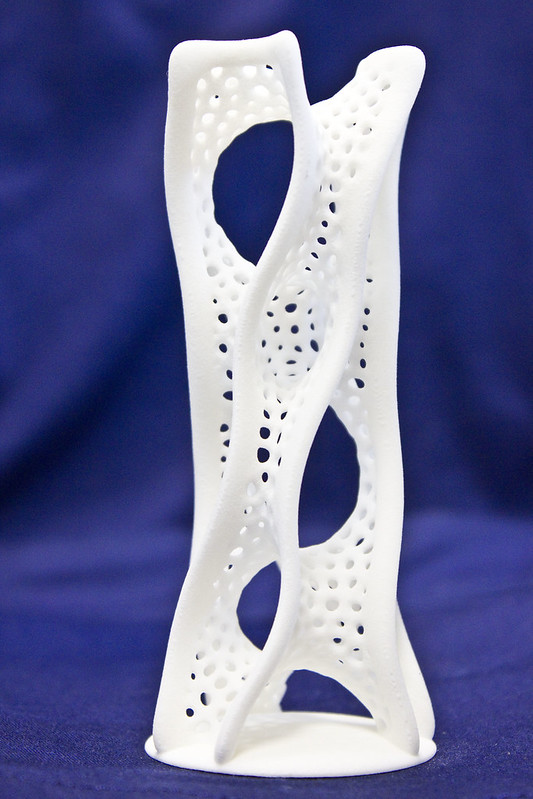
RepRapBCN - Professional SLS print !!
Part made in our Vanguard 2500. 0,1mm/layer and horizontal oriented.

juslem - Print time was 1:52:04 -
Unmodified STL from "Print competition Voronoi D Tower 1/4 res 1/2 size by @Dizingof"
Slic3r + Prusa Mendel + Marlin
0.25 layers, 25mm/s, 3 perimeters, 0.5 infill, on glass, bed temps first layer 60, next ones 50
The wonderful people over at Faberdashery are offering a £40 voucher to spend at www.faberdashery.co.uk on their Awesome PLA for the winner again this week!
I'm really thinking we will need a dedicated section for Competition printing, Maybe we can talk nicely to one of the RepRap Admins to get us a dedicated forum under fabrication?
And it true competition style, I'm going to sleep on the decision, so I'll update with the winner in the morning. Thanks to everyone that entered this round, make sure you enter again next week for more challenging fun!
*EDIT* -
The winner this week -
It was a very close competition this week and a difficult decision, but after reviewing all the entries I'm going to select billyzelsnack as this week's winner.
Billy's entry made me think and really stuck in my mind - it was printed with the Printxel, one of the lowest cost RepRap printers currently available. And the fact is was done with quite thick layers (0.33) and all the holes came out so well is a great achievement, the base is very good and it made me checkout the Kisslicer, very impressive.
I'm also highly impressed to see so many excellent ABS prints, especially benosteen done without a heated bed! so that get's a 'highly commended' award and almost pipped Billy's entry to the winning spot.
Over to you Billy - select us a good challenge for next week, and enjoy your great Faberdashery filament.
I would recommend starting a new thread for each week's competition, now that we have a dedicated forum section - thanks Rhys for setting it up.
*EDIT* -
Thanks for reading everyone,
Rich.
P.S. - Another of my challenging goals at the moment is to print the Ball of Stars by @Dizingof, my latest attempt just finished seconds ago as I got to the end of writing this post - Using new support settings courtesy of Jean-Marc of RepRapPro (Thanks again) I have a much better looking print, but I printed this 100mm sized one very fast (2hours 46 mins) and didn't enable Z lift,so I still have a few issues that slowing down and lift will solve, now I know it's going to work, I will print a bigger one!

Thursday, 7 June 2012
Key Skins - #30DoC Day 7
The creative inspiration for Day 7 came out of necessity today, I had yet another Key given to me, and it was starting to get to the point of madness with all my key-rings and fobs. I decided to make it easy to recognise my keys at a glance and hopefully be able to remove some of my key-ring-trinkets.
Part of my 30 days of creativity ( #30DoC ) month -
I'm calling them Key Skins, and before you say, I know you can buy things a bit like this, but I wanted to make them *custom* and different coloured, also I wanted them to fit my keys and not take up too much extra space.

 The first job was to simply scan my keys, import the image into Sketchup and trace around the outline of the key, much easier then measuring anything.
 Then just extrude the outline and put a top on it. I made the internal dimension 2.6mm as most keys seem to be under 2.5mm thick.
 Within 15 minutes I had the basic Key-Skin for the two most common shaped keys I have.
 Quick Print, and they fit well.
 Add some extra identification (H = House, G = Garage etc.)
 The possibilities are endless! I'm sure you can think of more uses for Key Skins - Files are up on Thingiverse
Print them in Bright fluorescent colours if you always loose your keys!
Thanks for reading, more tomorrow.
Cheers,
Rich.
Part of my 30 days of creativity ( #30DoC ) month -
I'm calling them Key Skins, and before you say, I know you can buy things a bit like this, but I wanted to make them *custom* and different coloured, also I wanted them to fit my keys and not take up too much extra space.


Print them in Bright fluorescent colours if you always loose your keys!
Thanks for reading, more tomorrow.
Cheers,
Rich.
Half a Ball of Stars - Support structures #30DoC day 6
For Day 6 of 30 days of creativity ( #30DoC ) I'm having a rest from designing things, but I wanted to give my printer a challenging print while I worked.
A few weeks ago I did a quick test print of the Ball of Stars Created by @Dizingof
I used basic support structure and low-grade PLA just to test it out.
I have been meaning to print another one, much bigger and with full support structure. Today I set it off to print while I worked. It would have been a 17+ hour print, but 9 hours into it, at about half way it shifted on the Y axis, probably due to the head catching on the massive structure with the rather high acceleration settings I use on MendelMax.
 Some of the support removed.
 You can see that about 40% into the build the Y axis shifted, so when I came home I stopped the print.
 Before removing support - This is what it looked like after 9 hours of printing (the half a ball of stars is inside there somewhere!)
 This was my first test print a few weeks back, I didn't clean all the support structure off, and it had some unsupported areas, this was sliced with Skeinforge V46 using external support structure at >60 degrees overhang giving me some sections that sagged when they printed in free space.
 For the new print today, I made it 150mm wide and enabled support everywhere, as you can see from the above Visual Gcode (Repetier Host) it was a real monster! Skeinforge had to slice for almost 2 hours to output the Gcode for it.
In hindsight a little too ambitious and I should have slowed down the travel moves and enabled Z Lift (Hop) I think it would have printed OK if I had done that.
 Doing the same model in Slic3r with support enabled only gives a support column in the centre of the model, so I could not use Slic3r for this print unfortunately, a real shame as it slices in just 8 mins.


 It needs a little more support removed, but I'm quite happy with how it came out, and it would have looked really good as a complete model and not for the Y Axis Shift.
My proposed new settings for a future print attempt -
 I have sliced it again and this time enabled Z lift (Hop) and used Exterior Only support with a 45 Degree minimum support angle, this should give me some support on almost everything, but not cover the entire model.
These are my support settings shown above, if anyone can give any advice to improve these, do get in touch or leave a comment, I hardly ever use support, so could do with any pointers you have.
 It still looks like a lot of material, but compare the Gcode image below with the failed print above -
 Fingers crossed, it should print well next time, and have a lot less support material to remove.
I'll give it another try soon and give an update.
Thanks for reading,
Cheers,
Rich.
A few weeks ago I did a quick test print of the Ball of Stars Created by @Dizingof
I used basic support structure and low-grade PLA just to test it out.
I have been meaning to print another one, much bigger and with full support structure. Today I set it off to print while I worked. It would have been a 17+ hour print, but 9 hours into it, at about half way it shifted on the Y axis, probably due to the head catching on the massive structure with the rather high acceleration settings I use on MendelMax.


In hindsight a little too ambitious and I should have slowed down the travel moves and enabled Z Lift (Hop) I think it would have printed OK if I had done that.


It is fun watching these things print.

And it used a fair bit of PLA.

Removal of the support structure is quite easy, but takes a little time.

My proposed new settings for a future print attempt -

These are my support settings shown above, if anyone can give any advice to improve these, do get in touch or leave a comment, I hardly ever use support, so could do with any pointers you have.


I'll give it another try soon and give an update.
Thanks for reading,
Cheers,
Rich.
Subscribe to:
Posts (Atom)